
mcp-client-cli
byadhikasp· 3 MCP servers
A simple CLI program to run LLM prompt and implement Model Context Protocol (MCP) client.
How to install mcp-client-cli?
adhikasp/mcp-client-cli
$git clone https://github.com/adhikasp/mcp-client-cliInstalls into the current project.
›Prefer a prompt? Paste this to your agent
Install mcp-client-cli by running `git clone https://github.com/adhikasp/mcp-client-cli`, then use it for the current task and follow its documentation at https://github.com/adhikasp/mcp-client-cli.
README.md
| 1 | # MCP CLI client |
| 2 | |
| 3 | A simple CLI program to run LLM prompt and implement [Model Context Protocol (MCP)](https://modelcontextprotocol.io/) client. |
| 4 | |
| 5 | You can use any [MCP-compatible servers](https://github.com/punkpeye/awesome-mcp-servers) from the convenience of your terminal. |
| 6 | |
| 7 | This act as alternative client beside Claude Desktop. Additionally you can use any LLM provider like OpenAI, Groq, or local LLM model via [llama](https://github.com/ggerganov/llama.cpp). |
| 8 | |
| 9 | 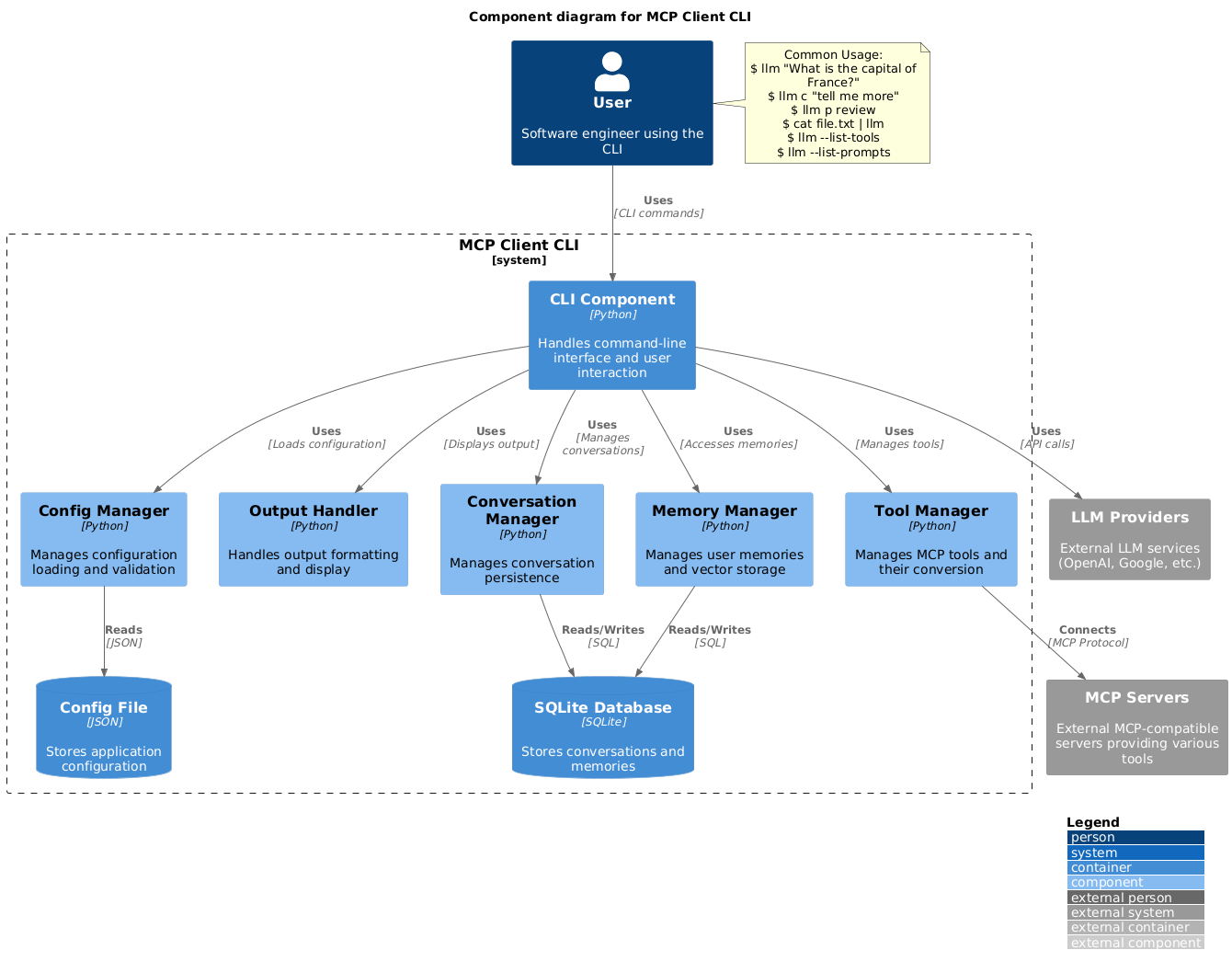 |
| 10 | |
| 11 | ## Setup |
| 12 | |
| 13 | 1. Install via pip: |
| 14 | ```bash |
| 15 | pip install mcp-client-cli |
| 16 | ``` |
| 17 | |
| 18 | 2. Create a `~/.llm/config.json` file to configure your LLM and MCP servers: |
| 19 | ```json |
| 20 | { |
| 21 | "systemPrompt": "You are an AI assistant helping a software engineer...", |
| 22 | "llm": { |
| 23 | "provider": "openai", |
| 24 | "model": "gpt-4", |
| 25 | "api_key": "your-openai-api-key", |
| 26 | "temperature": 0.7, |
| 27 | "base_url": "https://api.openai.com/v1" // Optional, for OpenRouter or other providers |
| 28 | }, |
| 29 | "mcpServers": { |
| 30 | "fetch": { |
| 31 | "command": "uvx", |
| 32 | "args": ["mcp-server-fetch"], |
| 33 | "requires_confirmation": ["fetch"], |
| 34 | "enabled": true, // Optional, defaults to true |
| 35 | "exclude_tools": [] // Optional, list of tool names to exclude |
| 36 | }, |
| 37 | "brave-search": { |
| 38 | "command": "npx", |
| 39 | "args": ["-y", "@modelcontextprotocol/server-brave-search"], |
| 40 | "env": { |
| 41 | "BRAVE_API_KEY": "your-brave-api-key" |
| 42 | }, |
| 43 | "requires_confirmation": ["brave_web_search"] |
| 44 | }, |
| 45 | "youtube": { |
| 46 | "command": "uvx", |
| 47 | "args": ["--from", "git+https://github.com/adhikasp/mcp-youtube", "mcp-youtube"] |
| 48 | } |
| 49 | } |
| 50 | } |
| 51 | ``` |
| 52 | |
| 53 | Note: |
| 54 | - See [CONFIG.md](CONFIG.md) for complete documentation of the configuration format |
| 55 | - Use `requires_confirmation` to specify which tools need user confirmation before execution |
| 56 | - The LLM API key can also be set via environment variables `LLM_API_KEY` or `OPENAI_API_KEY` |
| 57 | - The config file can be placed in either `~/.llm/config.json` or `$PWD/.llm/config.json` |
| 58 | - You can comment the JSON config file with `//` if you like to switch around the configuration |
| 59 | |
| 60 | 3. Run the CLI: |
| 61 | ```bash |
| 62 | llm "What is the capital city of North Sumatra?" |
| 63 | ``` |
| 64 | |
| 65 | ## Usage |
| 66 | |
| 67 | ### Basic Usage |
| 68 | |
| 69 | ```bash |
| 70 | $ llm What is the capital city of North Sumatra? |
| 71 | The capital city of North Sumatra is Medan. |
| 72 | ``` |
| 73 | |
| 74 | You can omit the quotes, but be careful with bash special characters like `&`, `|`, `;` that might be interpreted by your shell. |
| 75 | |
| 76 | You can also pipe input from other commands or files: |
| 77 | |
| 78 | ```bash |
| 79 | $ echo "What is the capital city of North Sumatra?" | llm |
| 80 | The capital city of North Sumatra is Medan. |
| 81 | |
| 82 | $ echo "Given a location, tell me its capital city." > instructions.txt |
| 83 | $ cat instruction.txt | llm "West Java" |
| 84 | The capital city of West Java is Bandung. |
| 85 | ``` |
| 86 | |
| 87 | ### Image Input |
| 88 | |
| 89 | You can pipe image files to analyze them with multimodal LLMs: |
| 90 | |
| 91 | ```bash |
| 92 | $ cat image.jpg | llm "What do you see in this image?" |
| 93 | [LLM will analyze and describe the image] |
| 94 | |
| 95 | $ cat screenshot.png | llm "Is there any error in this screenshot?" |
| 96 | [LLM will analyze the screenshot and point out any errors] |
| 97 | ``` |
| 98 | |
| 99 | ### Using Prompt Templates |
| 100 | |
| 101 | You can use predefined prompt templates by using the `p` prefix followed by the template name and its arguments: |
| 102 | |
| 103 | ```bash |
| 104 | # List available prompt templates |
| 105 | $ llm --list-prompts |
| 106 | |
| 107 | # Use a template |
| 108 | $ llm p review # Review git changes |
| 109 | $ llm p commit # Generate commit message |
| 110 | $ llm p yt url=https://youtube.com/... # Summarize YouTube video |
| 111 | ``` |
| 112 | |
| 113 | ### Triggering a tool |
| 114 | |
| 115 | ```bash |
| 116 | $ llm What is the top article on hackernews today? |
| 117 | |
| 118 | ================================== Ai Message ================================== |
| 119 | Tool Calls: |
| 120 | brave_web_search (call_eXmFQizLUp8TKBgPtgFo71et) |
| 121 | Call ID: call_eXmFQizLUp8TKBgPtgFo71et |
| 122 | Args: |
| 123 | query: site:news.ycombinator.com |
| 124 | count: 1 |
| 125 | Brave Search MCP Server running on stdio |
| 126 | |
| 127 | # |
Related
6 picksType
- langchain-mcp-adaptersMake Anthropic Model Context Protocol (MCP) tools compatible with LangChain and LangGraph agents.Jul 2026
- mcporterTypeScript runtime and CLI for connecting to configured Model Context Protocol servers.Jul 2026
- mcp-proxyA MCP server which proxies requests to a remote MCP server over streamable HTTP or SSE.Jul 2026
- mcp-atlassianThe Model Context Protocol (MCP) Atlassian integration is an open-source implementation that bridges Atlassian products (Jira and Confluence) with AI language models following Anthropic's MCP specification.Jul 2026
- open-webuiOpen WebUIJul 2026
- rulesyncUnified AI rules management CLI tool that generates configuration files for various AI development toolsJul 2026


