
Olares
starsforks
How to install Olares?
beclab/olares
$git clone https://github.com/beclab/Olares</div>
README.md
| 1 | <h1 align="center">Olares</h1> |
| 2 | |
| 3 | <p align="center"><strong>Your AI Agent. Your Data. Your Hardware.</strong></p> |
| 4 | |
| 5 | <p align="center"> |
| 6 | <a href="#get-started">Install Olares</a> · |
| 7 | <a href="https://www.olares.com/docs/developer/cli-agent-skills">Manage Olares with AI</a> · |
| 8 | <a href="#contributing">Contribute</a> |
| 9 | </p> |
| 10 | |
| 11 | <div align="center"> |
| 12 | |
| 13 | [](https://github.com/beclab/olares/releases) |
| 14 | [](https://github.com/beclab/Olares/stargazers) |
| 15 | [](https://discord.gg/olares) |
| 16 | [](https://github.com/beclab/olares/blob/main/LICENSE) |
| 17 | |
| 18 | <a href="https://trendshift.io/repositories/15376" target="_blank"><img src="https://trendshift.io/api/badge/repositories/15376" alt="beclab%2FOlares | Trendshift" style="width: 250px; height: 55px;" width="250" height="55"/></a> |
| 19 | |
| 20 | <p> |
| 21 | <a href="./README.md"><img alt="Readme in English" src="https://img.shields.io/badge/English-FFFFFF"></a> |
| 22 | <a href="./README_CN.md"><img alt="Readme in Chinese" src="https://img.shields.io/badge/简体中文-FFFFFF"></a> |
| 23 | <a href="./README_JP.md"><img alt="Readme in Japanese" src="https://img.shields.io/badge/日本語-FFFFFF"></a> |
| 24 | </p> |
| 25 | |
| 26 | </div> |
| 27 | |
| 28 | |
| 29 | **Olares is an open-source personal cloud OS you operate in plain language, built to run AI agents and LLMs on hardware you own.** |
| 30 | |
| 31 | Powered by Kubernetes, it turns your machines into a self-hosted AI platform accessible from any browser, giving everyone from individual users to small teams a unified place for compute, storage, networking, and apps. |
| 32 | |
| 33 | https://github.com/user-attachments/assets/01490c33-41ce-46fe-8450-6939b40db98e |
| 34 | |
| 35 | > 🌟 *If Olares is useful to you, consider giving the project a star. Your support encourages us to keep improving it.* |
| 36 | |
| 37 | ## Why Olares |
| 38 | |
| 39 | Great AI needs to know you. That requires access to your files, messages, and history. Many cloud AI services store this sensitive data on third-party servers and charge based on usage. |
| 40 | |
| 41 | Olares brings AI home, so you can run agents like [OpenClaw](https://www.olares.com/docs/use-cases/openclaw) with local LLMs on hardware you own while still enjoying the access and convenience of the cloud. |
| 42 | |
| 43 | 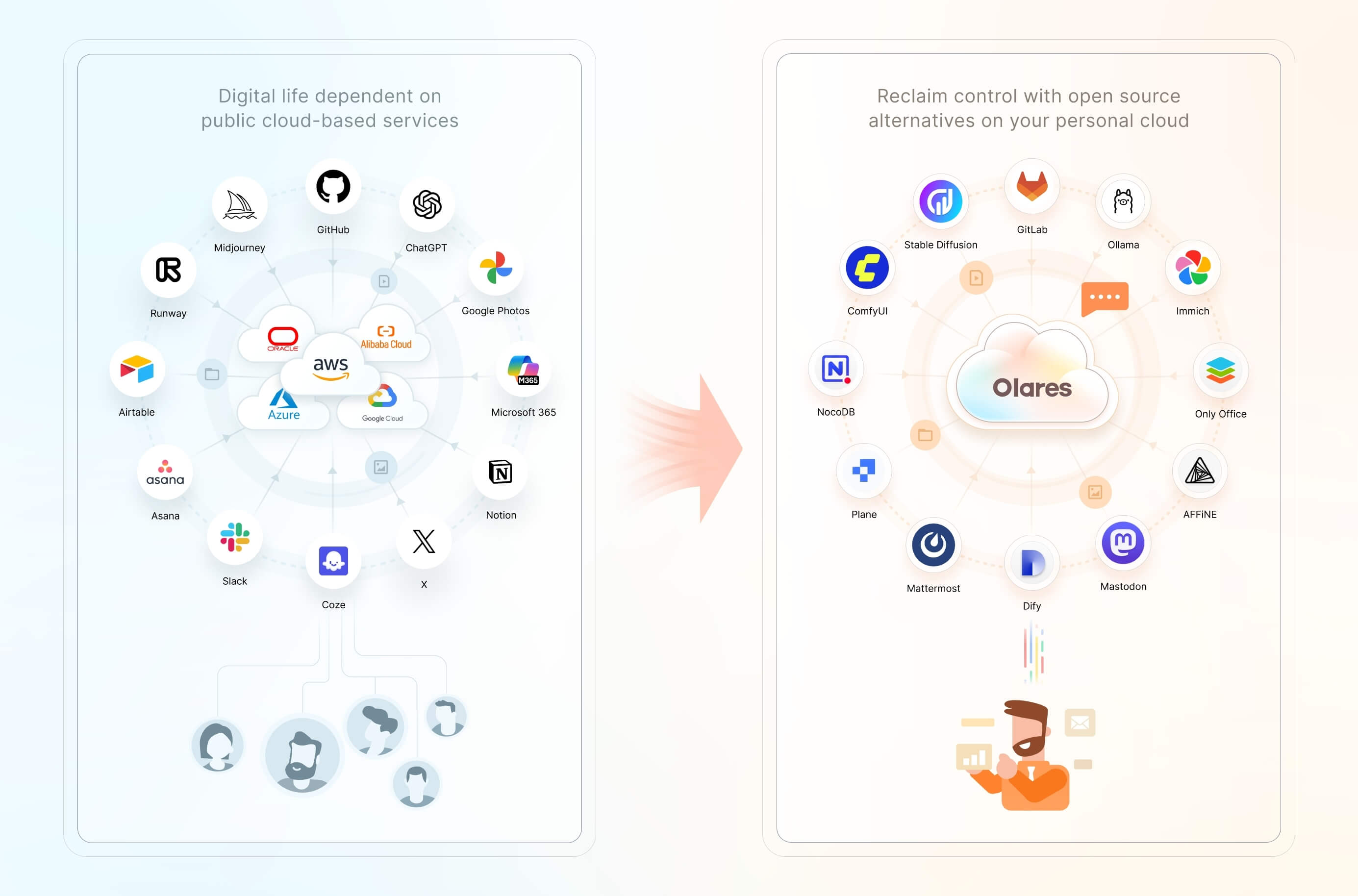 |
| 44 | |
| 45 | Features include: |
| 46 | |
| 47 | - **One-click local AI:** Install open-source AI apps and models from [Olares Market](https://www.olares.com/market/) with one click. |
| 48 | - **Accelerated computing management:** Pool GPUs and other accelerators across nodes, with time-slicing, memory-slicing, and exclusive GPU modes for AI, media, and gaming workloads. |
| 49 | - **[Files and storage management](https://www.olares.com/docs/manual/olares/files/):** Access local files, synced data, connected cloud storage, and external SMB/NFS shares through the built-in Files app, with [configurable backups](https://www.olares.com/docs/manual/olares/settings/backup). |
| 50 | - **[Private networking and access controls](https://www.olares.com/docs/developer/concepts/network):** Use a private VPN, reverse proxy, and public, private, or internal entrances to give apps HTTPS endpoints without manually exposing individual ports. |
| 51 | - **Anytime, anywhere access:** Use your Olares ID and [LarePass](https://www.olares.com/docs/manual/larepass/) to access all your services from a phone, desktop, or browser. |
| 52 | - **A suite of system apps:** Files, Vault, Market, Dashboard, Control Hub, and more, ready the moment you log in. |
| 53 | |
| 54 | ## Get started |
| 55 | |
| 56 | ### Linux script requirements |
| 57 | |
| 58 | Olares installs on a Linux host (bare metal or VM), with dedicated installation methods for Windows, macOS, and Raspberry Pi. Requirements vary by platform and installation method. The Linux s |
People who liked this also viewed
6 picksType
- mcp-proxy-for-awsAWS MCP Proxy ServerMCP ServersJul 2026
- pydantic-ai-backendFile Storage & Sandbox Backends for Pydantic AI: console tools for file operations, Docker-isolated sandboxes for safe execution, and permission system with presets for access control. Enables secure multi-user handling and testing in agents via in-memory, local, or containerized storage.MCP ServersJul 2026
- mcp-for-argocdAn implementation of Model Context Protocol (MCP) server for Argo CD.MCP ServersJul 2026
- heroku-mcp-serverHeroku Platform MCP Server using the Heroku CLIMCP ServersJul 2026
- ghost-mcpA Model Context Protocol (MCP) server for interacting with Ghost CMS through LLM interfaces like Claude. Allow you to control your Ghost blog by simply asking Claude etc.MCP ServersApr 2026
- Google DriveUpload, organize, and share files in the cloud. Manage folders, set permissions, and search across stored documents.MCP Serversrecently


