
> [!NOTE] > Brought to you by Bytebase, open-source database DevSecOps platform.
How to install dbhub?
bytebase/dbhub
$git clone https://github.com/bytebase/dbhubInstalls into the current project.
›Prefer a prompt? Paste this to your agent
Install dbhub by running `git clone https://github.com/bytebase/dbhub`, then use it for the current task and follow its documentation at https://github.com/bytebase/dbhub.
README.md
| 1 | > [!NOTE] |
| 2 | > Brought to you by [Bytebase](https://www.bytebase.com/), open-source database DevSecOps platform. |
| 3 | |
| 4 | <p align="center"> |
| 5 | <a href="https://dbhub.ai/" target="_blank"> |
| 6 | <picture> |
| 7 | <source media="(prefers-color-scheme: dark)" srcset="https://raw.githubusercontent.com/bytebase/dbhub/main/docs/images/logo/full-dark.svg" width="75%"> |
| 8 | <source media="(prefers-color-scheme: light)" srcset="https://raw.githubusercontent.com/bytebase/dbhub/main/docs/images/logo/full-light.svg" width="75%"> |
| 9 | <img src="https://raw.githubusercontent.com/bytebase/dbhub/main/docs/images/logo/full-light.svg" width="75%" alt="DBHub Logo"> |
| 10 | </picture> |
| 11 | </a> |
| 12 | </p> |
| 13 | |
| 14 | ```bash |
| 15 | +------------------+ +--------------+ +------------------+ |
| 16 | | | | | | | |
| 17 | | | | | | | |
| 18 | | Claude Desktop +--->+ +--->+ PostgreSQL | |
| 19 | | | | | | | |
| 20 | | Claude Code +--->+ +--->+ SQL Server | |
| 21 | | | | | | | |
| 22 | | Cursor +--->+ DBHub +--->+ SQLite | |
| 23 | | | | | | | |
| 24 | | VS Code +--->+ +--->+ MySQL | |
| 25 | | | | | | | |
| 26 | | Copilot CLI +--->+ +--->+ MariaDB | |
| 27 | | | | | | | |
| 28 | | | | | | | |
| 29 | +------------------+ +--------------+ +------------------+ |
| 30 | MCP Clients MCP Server Databases |
| 31 | ``` |
| 32 | |
| 33 | DBHub is a zero-dependency, token efficient MCP server implementing the Model Context Protocol (MCP) server interface. This lightweight gateway allows MCP-compatible clients to connect to and explore different databases: |
| 34 | |
| 35 | - **Local Development First**: Zero dependency, token efficient with just two MCP tools to maximize context window |
| 36 | - **Multi-Database**: PostgreSQL, MySQL, MariaDB, SQL Server, and SQLite through a single interface |
| 37 | - **Multi-Connection**: Connect to multiple databases simultaneously with TOML configuration |
| 38 | - **Guardrails**: Read-only mode, row limiting, and query timeout to prevent runaway operations |
| 39 | - **Secure Access**: SSH tunneling and SSL/TLS encryption |
| 40 | |
| 41 | ## Supported Databases |
| 42 | |
| 43 | PostgreSQL, MySQL, SQL Server, MariaDB, and SQLite. |
| 44 | |
| 45 | ## MCP Tools |
| 46 | |
| 47 | DBHub implements MCP tools for database operations: |
| 48 | |
| 49 | - **[execute_sql](https://dbhub.ai/tools/execute-sql)**: Execute SQL queries with transaction support and safety controls |
| 50 | - **[search_objects](https://dbhub.ai/tools/search-objects)**: Search and explore database schemas, tables, columns, indexes, and procedures with progressive disclosure |
| 51 | - **[Custom Tools](https://dbhub.ai/tools/custom-tools)**: Define reusable, parameterized SQL operations in your `dbhub.toml` configuration file |
| 52 | |
| 53 | ## Workbench |
| 54 | |
| 55 | DBHub includes a [built-in web interface](https://dbhub.ai/workbench/overview) for interacting with your database tools. It provides a visual way to execute queries, run custom tools, and view request traces without requiring an MCP client. |
| 56 | |
| 57 | 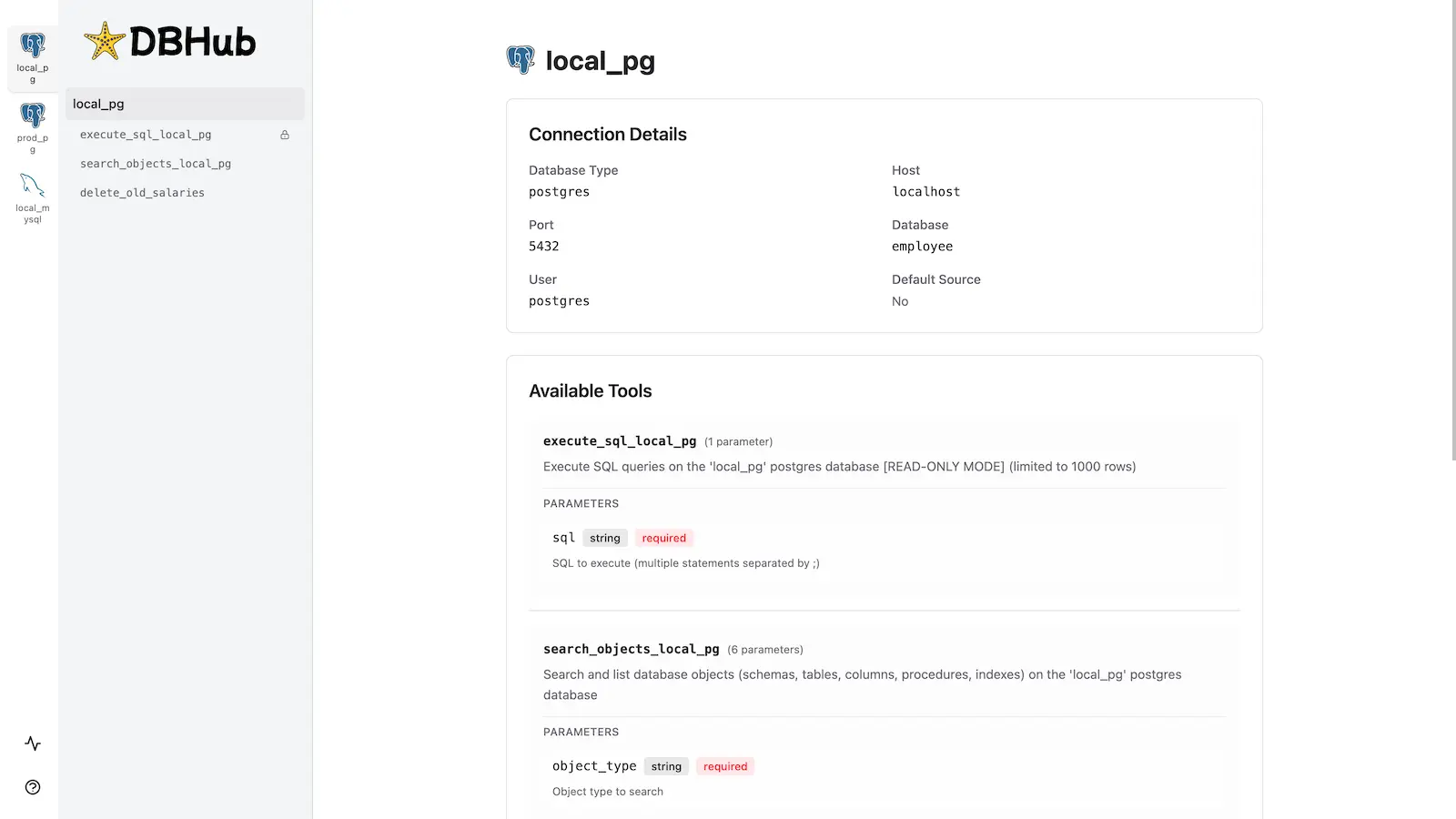 |
| 58 | |
| 59 | ## Installation |
| 60 | |
| 61 | See the full [Installation Guide](https://dbhub.ai/installation) for detailed instructions. |
| 62 | |
| 63 | ### Quick Start |
| 64 | |
| 65 | **Docker:** |
| 66 | |
| 67 | ```bash |
| 68 | docker run --rm --init \ |
| 69 | --name dbhub \ |
| 70 | --publish 8080:8080 \ |
| 71 | bytebase/dbhub \ |
| 72 | --transport http \ |
| 73 | --port 8080 \ |
| 74 | --dsn "postgres://user:password@localhost:5432/dbname?sslmode=disable" |
| 75 | ``` |
| 76 | |
| 77 | **NPM:** (requires Node.js >= 22.5.0) |
| 78 | |
| 79 | ```bash |
| 80 | npx @bytebase/dbhub@latest --transport http --port 8080 --dsn "postgres://user:pass |
Related
6 picksType
- mcp-databricks-serverModel Context Protocol (MCP) server for Databricks that empowers AI agents to autonomously interact with Unity Catalog metadata. Enables data discovery, lineage analysis, and intelligent SQL execution.Mar 2026
- mcp-server-qdrantAn official Qdrant Model Context Protocol (MCP) server implementationJul 2026
- Supabase MCPQuery databases, manage projects and deploy edge functionstoday
- mongodb-mcp-serverMongoDB Model Context Protocol ServerJul 2026
- postgres-mcp-serverMCP server for interacting with PostgreSQL databasesJul 2025
- mcp-server-mysqlMCP server for interacting with MySQL databases with write operations supportJul 2026


