
note-gen
starsforks
How to install note-gen?
codexu/note-gen
$git clone https://github.com/codexu/note-gen> Capture first, organize later.
README.md
| 1 | <div align="center"> |
| 2 | <h1>NoteGen</h1> |
| 3 | <p><strong>Capture first, organize later.</strong></p> |
| 4 | <p> |
| 5 | <a href="https://notegen.top/en/">Documentation</a> |
| 6 | · |
| 7 | <a href="https://notegen.top/en/download">Download</a> |
| 8 | · |
| 9 | <a href="https://notegen.top/business">Business</a> |
| 10 | · |
| 11 | <a href="https://notegen.top/donate">Donate</a> |
| 12 | · |
| 13 | <a href="https://github.com/codexu/note-gen/discussions">Discussions</a> |
| 14 | </p> |
| 15 | <p> |
| 16 | <a href="https://github.com/codexu/note-gen/actions/workflows/release.yml"><img alt="Release workflow" src="https://img.shields.io/github/actions/workflow/status/codexu/note-gen/release.yml?branch=release&label=release&style=flat-square&logo=githubactions&logoColor=white"></a> |
| 17 | <a href="https://github.com/codexu/note-gen/blob/dev/LICENSE"><img alt="License" src="https://img.shields.io/github/license/codexu/note-gen?style=flat-square&color=0f766e"></a> |
| 18 | <img alt="Pricing: free" src="https://img.shields.io/badge/pricing-free-155eef?style=flat-square"> |
| 19 | </p> |
| 20 | <p> |
| 21 | <img alt="Tauri 2" src="https://img.shields.io/badge/Tauri-2-ffc131?style=flat-square&logo=tauri&logoColor=111111"> |
| 22 | <img alt="Next.js 15" src="https://img.shields.io/badge/Next.js-15-000000?style=flat-square&logo=nextdotjs&logoColor=white"> |
| 23 | <img alt="React 19" src="https://img.shields.io/badge/React-19-61dafb?style=flat-square&logo=react&logoColor=111111"> |
| 24 | <img alt="Tailwind CSS 4" src="https://img.shields.io/badge/Tailwind_CSS-4-06b6d4?style=flat-square&logo=tailwindcss&logoColor=white"> |
| 25 | </p> |
| 26 | <p> |
| 27 | <a href="https://trendshift.io/repositories/12784" target="_blank"><img src="https://trendshift.io/api/badge/repositories/12784" alt="codexu%2Fnote-gen | Trendshift" style="width: 250px; height: 55px;" width="250" height="55"/></a> |
| 28 | <a href="https://hellogithub.com/repository/0163cb946dca44cc8905dbe34c2c987b" target="_blank"><img src="https://abroad.hellogithub.com/v1/widgets/recommend.svg?rid=0163cb946dca44cc8905dbe34c2c987b&claim_uid=YJ39kIMBz1TGAvc" alt="Featured|HelloGitHub" style="width: 250px; height: 54px;" width="250" height="54" /></a> |
| 29 | <a href="https://www.producthunt.com/products/notegen-2?embed=true&utm_source=badge-featured&utm_medium=badge&utm_source=badge-notegen-2" target="_blank"><img src="https://api.producthunt.com/widgets/embed-image/v1/featured.svg?post_id=956348&theme=light&t=1749194675492" alt="NoteGen - A cross-platform Markdown note-taking application | Product Hunt" style="width: 250px; height: 54px;" width="250" height="54" /></a> |
| 30 | </p> |
| 31 | </div> |
| 32 | |
| 33 | ## Get Started |
| 34 | |
| 35 | > Capture first, organize later. |
| 36 | |
| 37 | NoteGen is an open-source, cross-platform note app that helps you capture rough information first and turn it into structured writing later. |
| 38 | |
| 39 | It works like a capture inbox, Markdown editor, and AI assistant in one app. Save scattered thoughts, voice recordings, screenshots, images, links, files, and todos in one place. When you are ready, let AI organize those raw records into clear notes, summaries, reports, articles, or reusable knowledge. |
| 40 | |
| 41 | 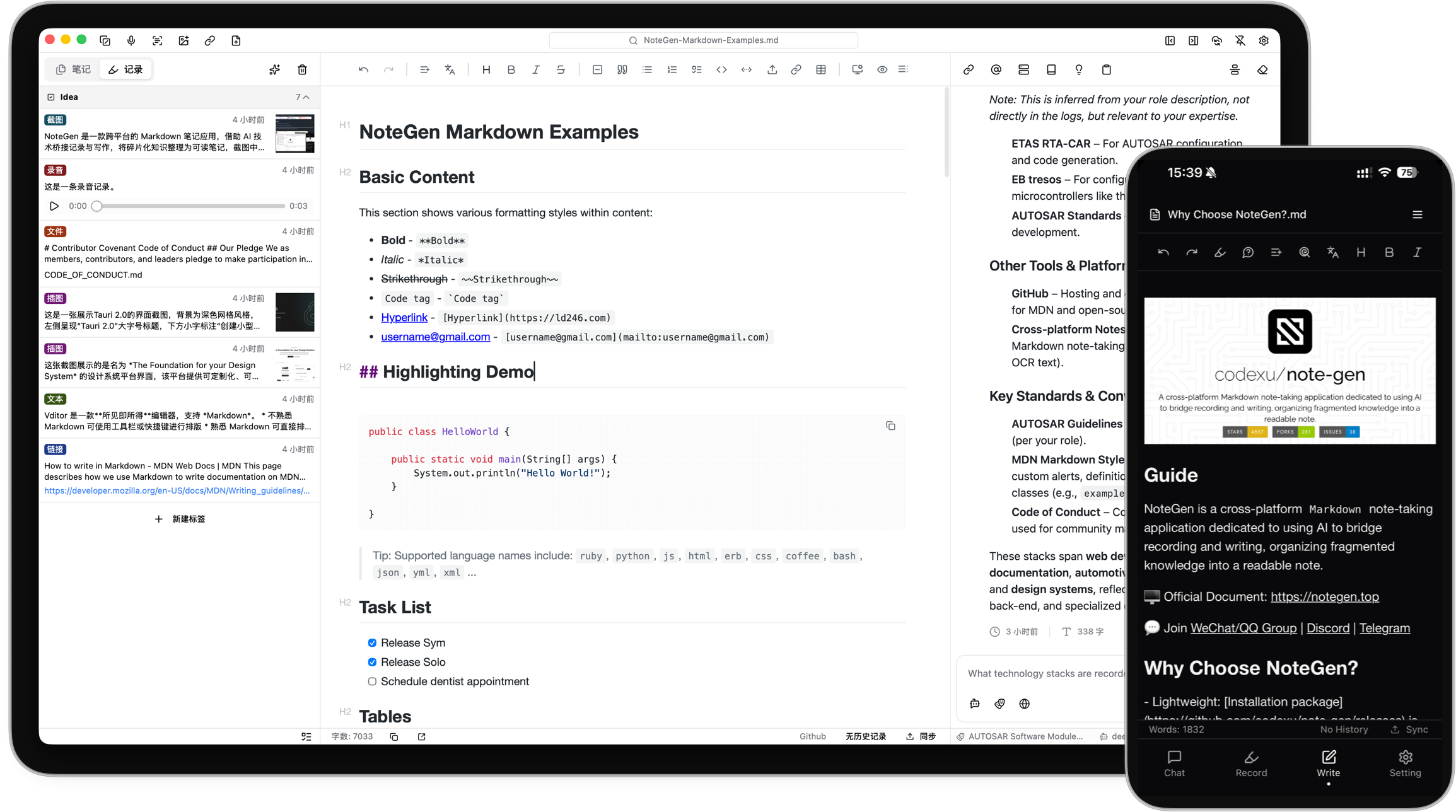 |
| 42 | |
| 43 | ## What Can NoteGen Do? |
| 44 | |
| 45 | NoteGen is built around a simple idea: do not force yourself to write a perfect note at the moment an idea appears. |
| 46 | |
| 47 | - 🧩 Capture anything quickly: text, voice, screenshots, images, links, files, and todos. |
| 48 | - 🧠 Turn messy records into organized notes: select records, choose a template, and generate structured Markdown. |
| 49 | - ✍️ Keep writing after AI helps: edit the result in a Markdown editor with tables, diagrams, math, outline, search, and export tools. |
| 50 | - 💬 Ask questions about your own material: chat with notes, records, and knowledge base content instead of starting from a blank prompt. |
| 51 | - 🖼️ Make images useful: save screenshots and images, run OCR or AI recognition, add descriptions, and reuse them in notes. |
| 52 | - 🔄 Work across devices: keep notes local as Markdown files and sync them through GitHub, Gitee, GitLab, Gitea, S3, or |
People who liked this also viewed
6 picksType
- excel-mcpA Model Context Protocol (MCP) server for working with Excel (.xlsx) files without requiring Microsoft Excel. Enables AI assistants to create, read, modify, and format spreadsheets using openpyxl, fully in Python and cross-platform.MCP ServersOct 2025
- memories-with-lessons-mcp-serverI enhance the existing memory mcp server from the official mcp github, so big thanks and credits for creating thisMCP ServersFeb 2025
- anytype-mcpAn MCP server enabling AI assistants to interact with Anytype - your encrypted, local and collaborative wiki - to organize objects, lists, and more through natural language.MCP ServersJul 2026
- mcp-server-kubernetesMCP Server for kubernetes management commandsMCP ServersJul 2026
- thoughtboxThoughtbox is an intention ledger for agents. Evaluate AI's decisions against its decision-making.MCP ServersJul 2026
- google-drive-mcpA Model Context Protocol (MCP) server that provides secure integration with Google Drive, Docs, Sheets, Slides and Calendar. It allows Claude Desktop and other MCP clients to manage files in Google Drive through a standardized interface.MCP ServersJul 2026


