
***
How to install eide?
github0null/eide
$git clone https://github.com/github0null/eideInstalls into the current project.
›Prefer a prompt? Paste this to your agent
Install eide by running `git clone https://github.com/github0null/eide`, then use it for the current task and follow its documentation at https://github.com/github0null/eide.
README.md
| 1 | # Embedded IDE |
| 2 | |
| 3 | [](https://em-ide.com/) |
| 4 | [](https://discuss.em-ide.com/) |
| 5 | [](https://marketplace.visualstudio.com/items?itemName=CL.eide) |
| 6 | [](https://marketplace.visualstudio.com/items?itemName=CL.eide) |
| 7 | [](https://marketplace.visualstudio.com/items?itemName=CL.eide&ssr=false#review-details) |
| 8 | |
| 9 | *** |
| 10 | |
| 11 | ## [中文](./README_ZH-CN.md) |
| 12 | |
| 13 | ## Summary 📑 |
| 14 | |
| 15 | A mcu development environment for `8051/STM8/Cortex-M/MIPS/RISC-V` on VsCode. |
| 16 | |
| 17 | Provide `8051/STM8/Cortex-M/MIPS/RISC-V` project development, compilation, program flash and other functions. |
| 18 | |
| 19 | Supported Platforms: |
| 20 | - **Windows x64 (>= Windows 10)** |
| 21 | - **Linux x64** |
| 22 | - **macOS**(Only tested in 'macOS 10.15 x64') |
| 23 | |
| 24 | 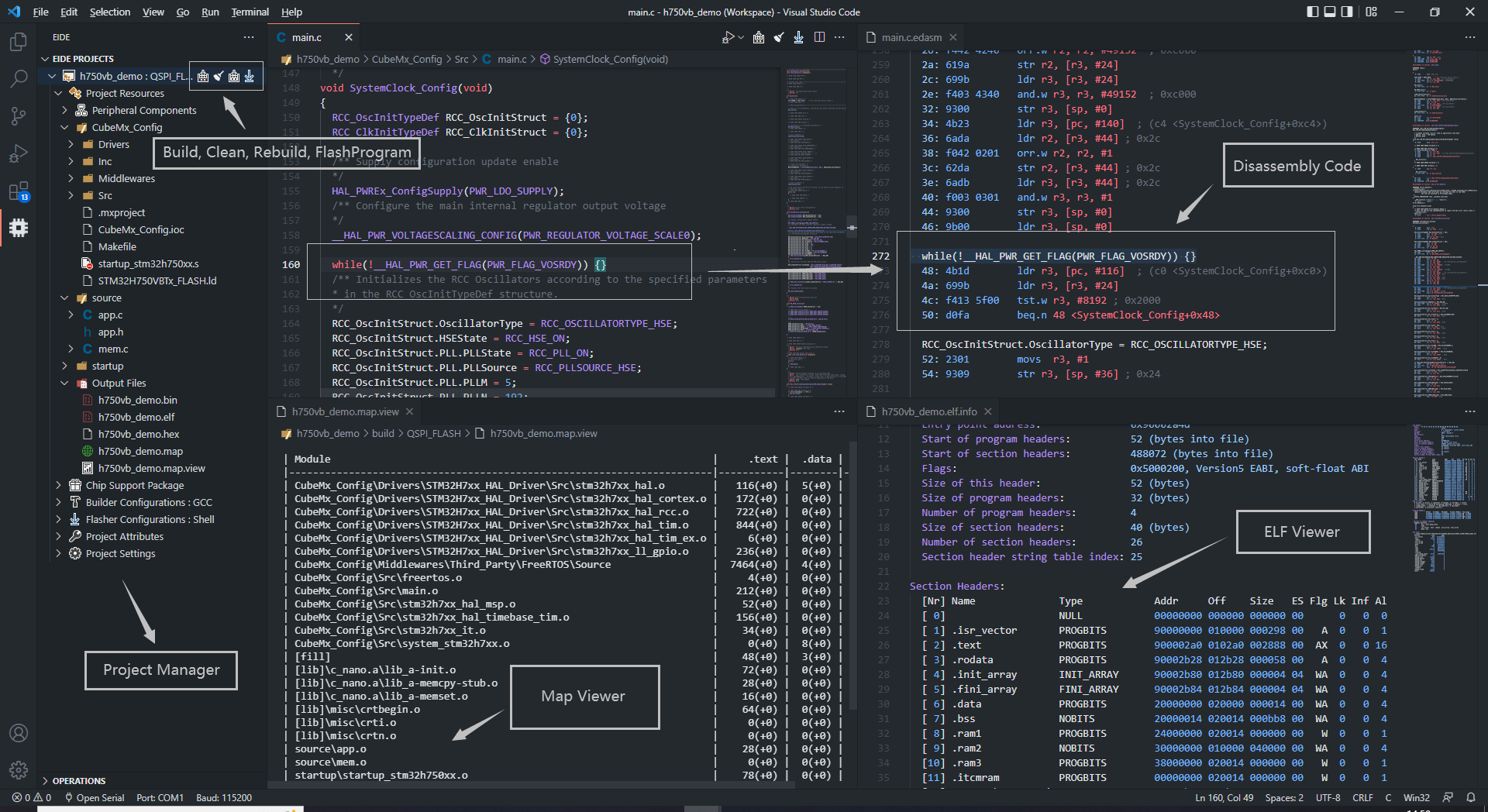 |
| 25 | |
| 26 | *** |
| 27 | |
| 28 | ## Features 🎉 |
| 29 | |
| 30 | * Support 8051, STM8, Cortex-M, MIPS MTI, RISC-V, GCC projects. |
| 31 | * Support to import KEIL5/IAR/Eclipse projects, support to import 'IAR-STM8, IAR-ARM, Segger Embedded Studio' project source file resource tree. |
| 32 | * Support for installing standard KEIL chip support packs (only for Cortex-M projects). |
| 33 | * Provides many project templates for quick start a project. |
| 34 | * Build, rebuild, support many toolchains (armcc, gcc-arm-none-eabi, llvm-for-arm, riscv-gcc, xxx-gcc, keil_c51, sdcc ...). |
| 35 | * Program flash, support: jlink, stlink, openocd, pyocd ... |
| 36 | * ~~Built-in serial port monitor~~ (recommended to use `Serial Monitor` plug-in). |
| 37 | * Supports static checking projects by using Cppcheck. |
| 38 | * Automatically generates default debug configurations for debugger plug-in `cortex-debug, STM8-Debug`. |
| 39 | * Built-in many utility tools, 'CMSIS Config Wizard UI', 'Disassembly view', 'Program resource view'... |
| 40 | * Built-in implement `C/C++ IntelliSense Provider` for `ms-vscode.cpptools`, **Not Need to** configurate `c_cpp_properties.json` file. |
| 41 | * Built-in Msys Unix Shell environment. |
| 42 | * Built-in Callgraph gui tool for gcc toolchain. |
| 43 | * Support the basic functions of the built-in plugins when calling MCP Tools (this needs to be enabled in the settings; MCP server is disabled by default). [Skills](https://gist.github.com/github0null/5c08fb61bb4a705f1dc9b03dcb980f93) |
| 44 | |
| 45 | *** |
| 46 | |
| 47 | ## Quick Start 🏃♀️ |
| 48 | |
| 49 | 1. Install any of the above compilers |
| 50 | |
| 51 | 2. Open the **Operations** bar of the extension to set the compiler installation path |
| 52 | |
| 53 | 3. Click on the `New` or `Import` function in the Operations bar to start your project |
| 54 | |
| 55 | *** |
| 56 | |
| 57 | ## Getting Start 📖 |
| 58 | |
| 59 | [https://em-ide.com](https://em-ide.com) |
| 60 | |
| 61 | *** |
| 62 | |
| 63 | ## Example |
| 64 | |
| 65 | - Create A Project By Internal Template |
| 66 | |
| 67 | 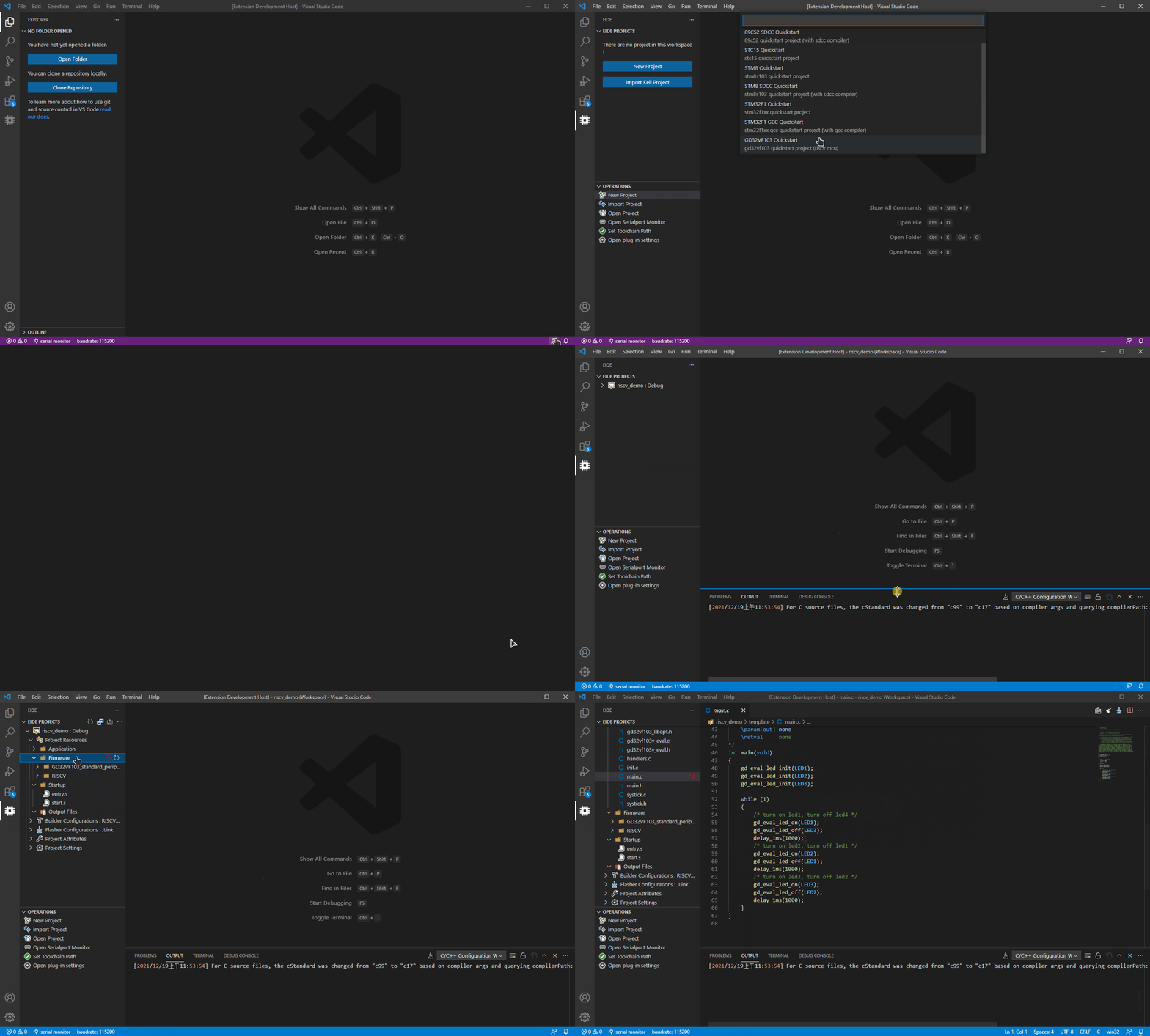 |
| 68 | |
| 69 | - Build Project |
| 70 | |
| 71 | 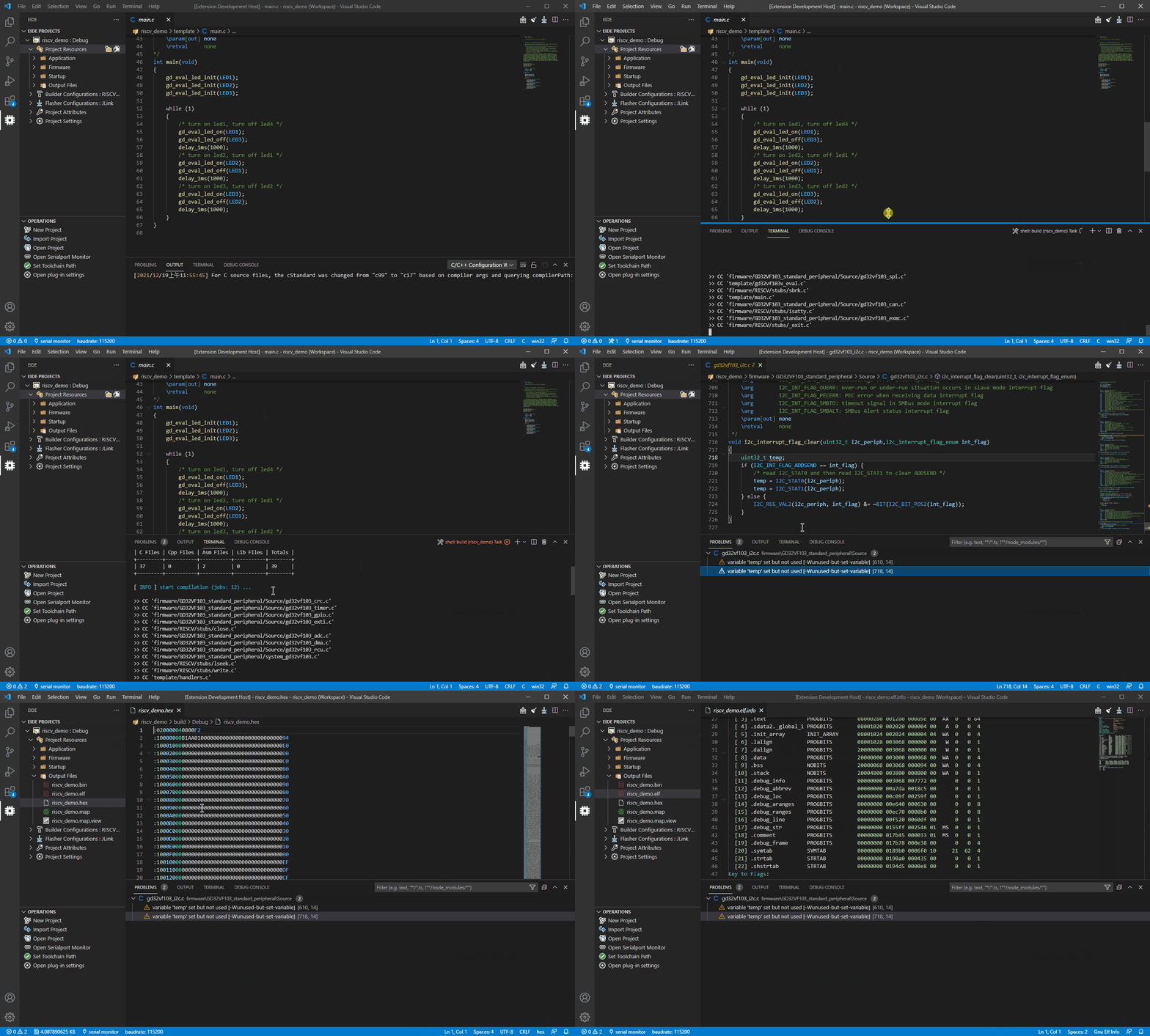 |
| 72 | |
| 73 | - Flash Project (It failed because there was no connection to the development board, for demonstration purposes only) |
| 74 | |
| 75 | 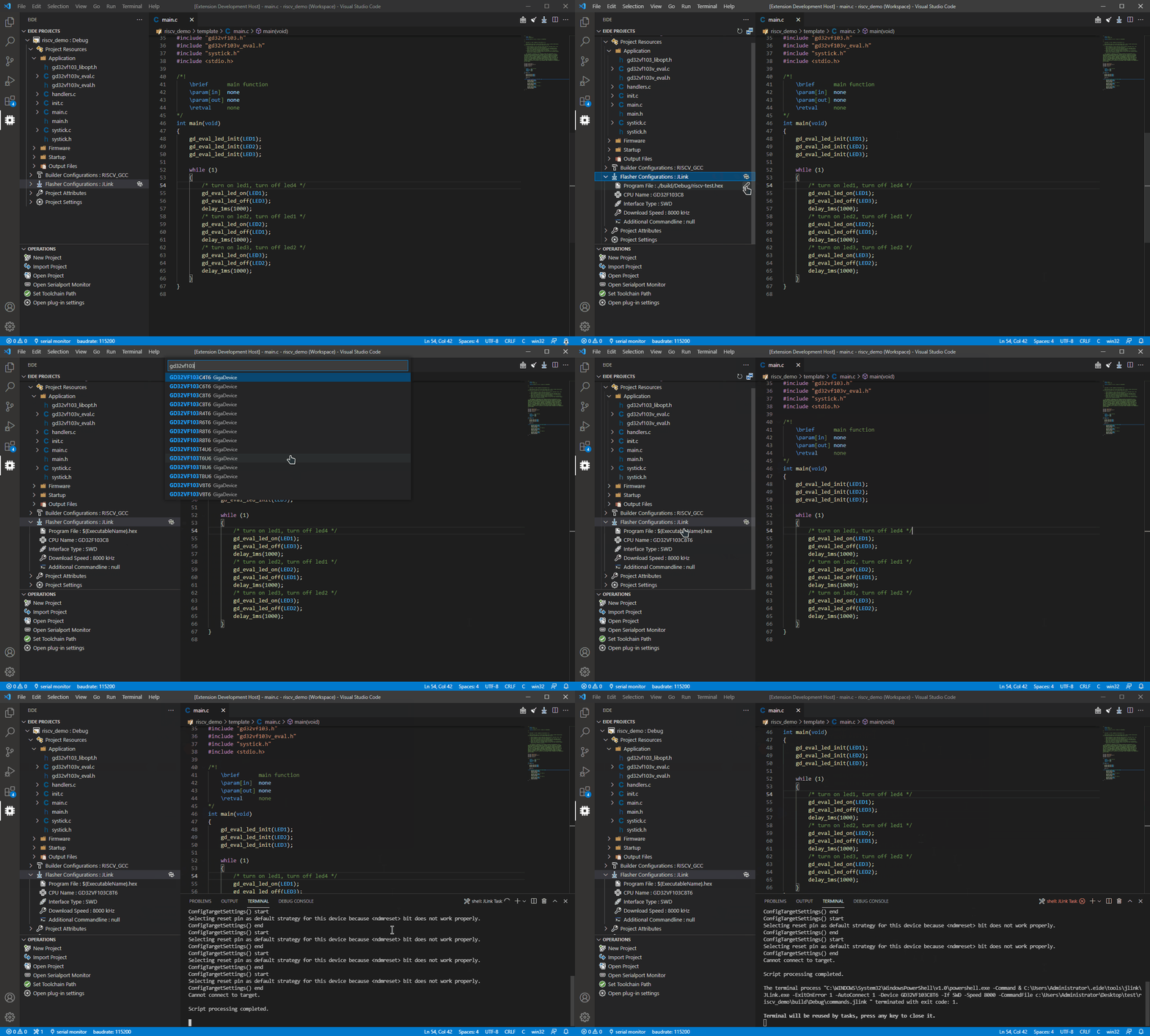 |
| 76 | |
| 77 | - Show Source File Disassembly Code |
| 78 | |
| 79 | 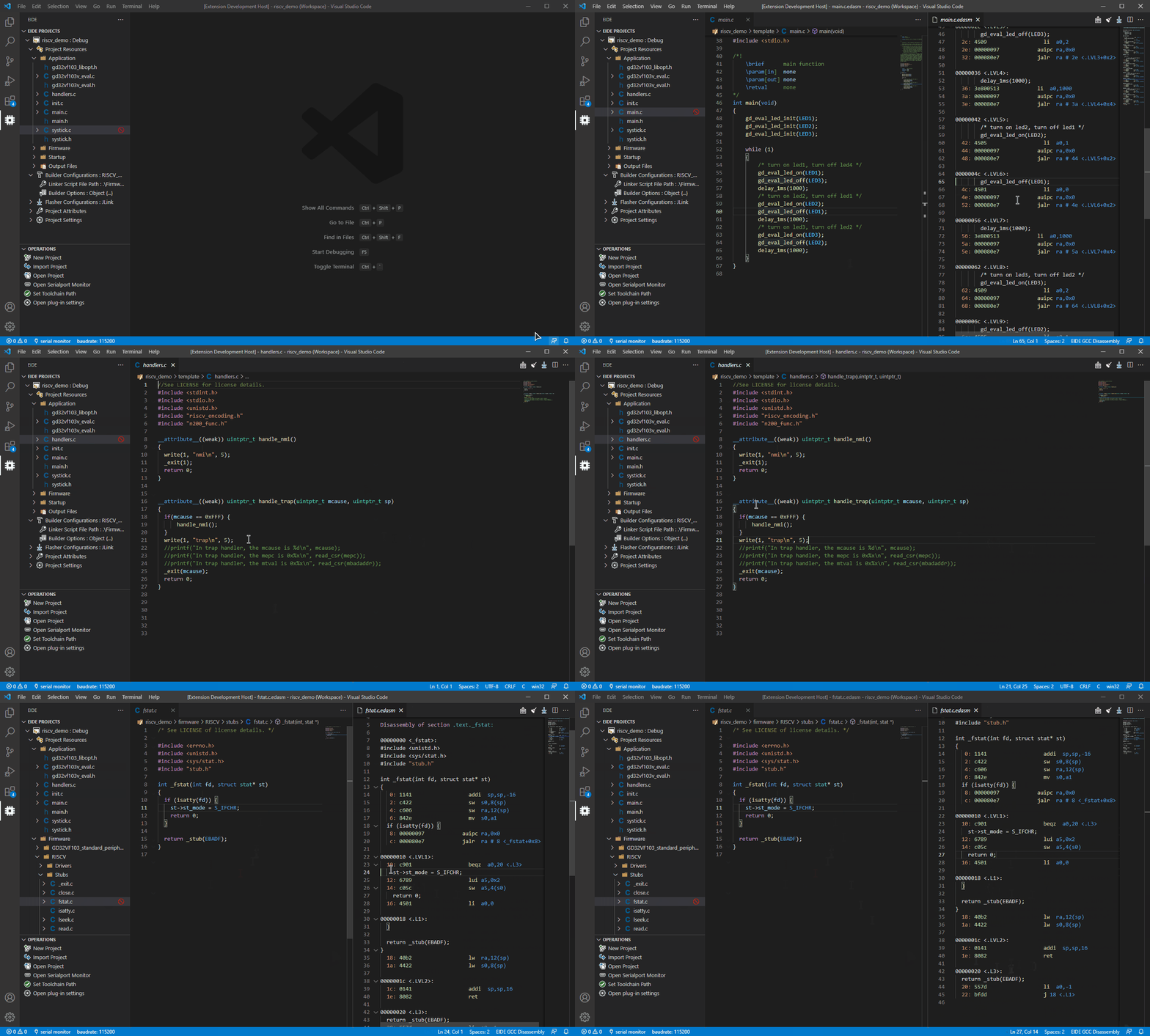 |
| 80 | |
| 81 | - Program Resource View |
| 82 | |
| 83 | 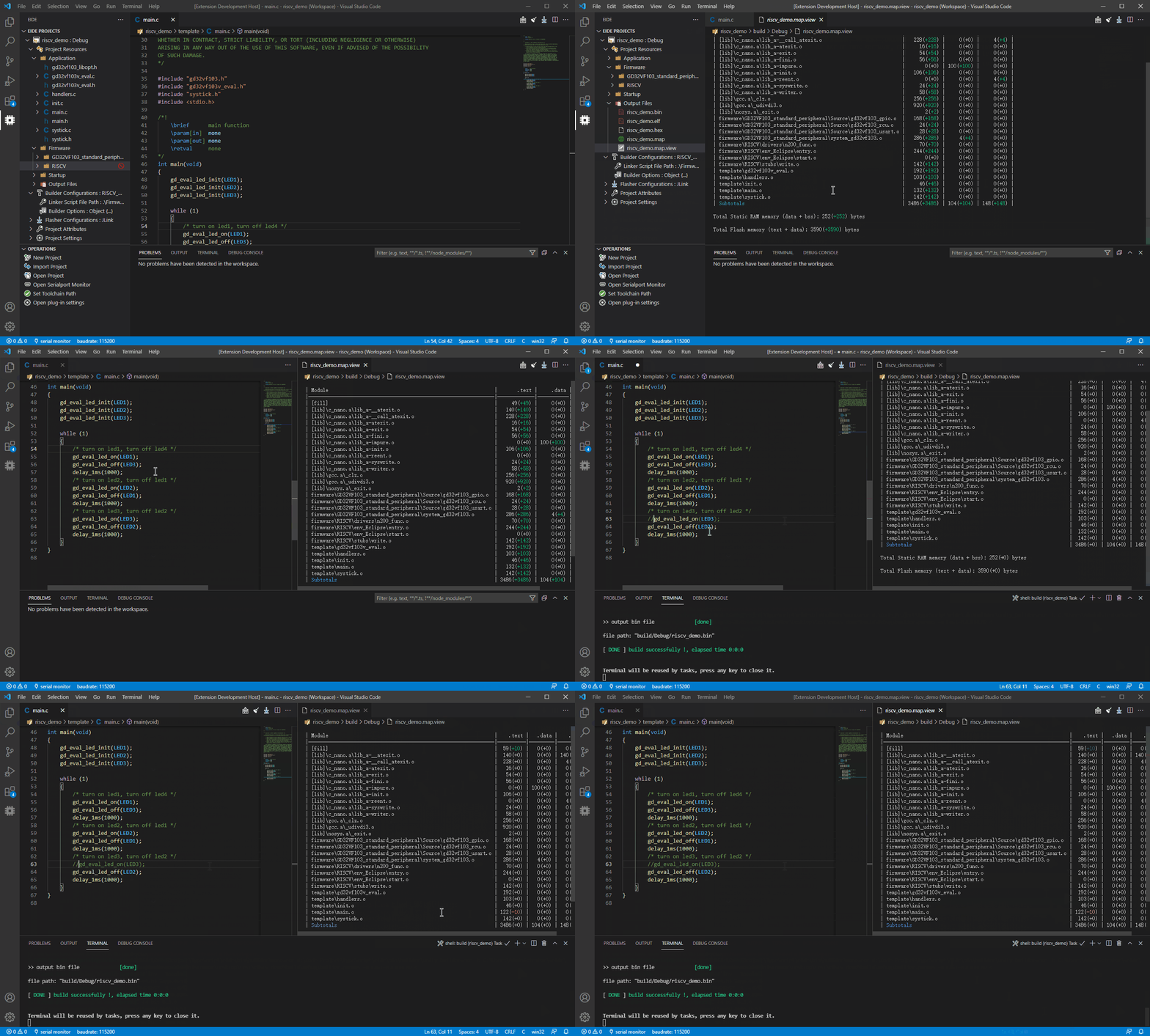 |
| 84 | |
| 85 | *** |
| 86 | |
| 87 | ## ChangeLog 📌 |
| 88 | |
| 89 | [ChangeLog](https://marketplace.visualstudio.com/items/CL.eide/changelog) |
| 90 | |
| 91 | *** |
| 92 | |
| 93 | ## Community 🌈 |
| 94 | |
| 95 | - [Github](https://github.com/github0null/eide/issues) |
| 96 | |
| 97 | - [Forum https://discuss.em-ide.com](https://discuss.em-ide.com/) |
| 98 | |
| 99 | *** |
| 100 | |
| 101 | ## How to build ? |
| 102 | |
| 103 | You can build this project by your self. |
| 104 | |
| 105 | > [!IMPORTANT] |
| 106 | > The required version of NodeJS is **18** because of some historical reasons for this extension. |
| 107 | |
| 108 | 1. Install `NodeJS 18` (recommanded v18.18.2). You can use `nvm` to manage your NodeJS. |
| 109 | Install `vsce` by `npm install -g cheerio@1.0.0-rc.9 @vscode/vsce@2.15.0` |
| 110 | |
| 111 | 2. Clone this repo, Open folder by vscode and then run command: |
| 112 | |
| 113 | ```shell |
| 114 | npm install |
| 115 | ``` |
| 116 | |
| 117 | 3. Press `ctrl+shift+b` to show vscode task |
| 118 | |
| 119 | - Use `npm: webpack` to build this exte |
Related
6 picksType
- mcp-server-circleciA Model Context Protocol (MCP) server implementation for CircleCI, enabling natural language interactions with CircleCI functionality through MCP-enabled clientsJul 2026
- mcp-for-argocdArgo CD MCP ServerJul 2026
- mcp-server-kubernetesMCP server for interacting with Kubernetes clusters via kubectlJul 2026
- hookdeck-cliCLI for Hookdeck: forward webhooks to localhost (ngrok alternative), manage and query Event Gateway resources (sources, connections, destinations, events), run the MCP server for AI agents. Free for dev.Jul 2026
- heroku-mcp-serverHeroku Platform MCP ServerJul 2026
- mcp-server-azure-devopsAzure DevOps reference server for the Model Context Protocol (MCP)Jul 2026


