
anyquery
starsforks
How to install anyquery?
julien040/anyquery
$git clone https://github.com/julien040/anyquery---
README.md
| 1 | # Anyquery |
| 2 | |
| 3 | <img src="https://anyquery.dev/images/logo-shadow.png" alt="Anyquery logo" width="96"></img> |
| 4 | |
| 5 |  |
| 6 |  |
| 7 | [](https://anyquery.dev) |
| 8 | [](https://github.com/julien040/anyquery/issues) |
| 9 | [](https://anyquery.dev/integrations/) |
| 10 | [](https://anyquery.dev/queries) |
| 11 | [](https://pkg.go.dev/github.com/julien040/anyquery/namespace) |
| 12 | [](https://archestra.ai/mcp-catalog/julien040__anyquery) |
| 13 | |
| 14 | --- |
| 15 | |
| 16 | <p align="center"> |
| 17 | <sub><i>Sponsored by</i></sub><br><br> |
| 18 | <a href="https://www.atlascloud.ai/?utm_source=github&utm_medium=link&utm_campaign=anyquery"> |
| 19 | <picture> |
| 20 | <source media="(prefers-color-scheme: dark)" srcset="https://cdn.julienc.me/share/atlas-cloud-logo-white.svg"> |
| 21 | <img src="https://cdn.julienc.me/share/atlas-cloud-logo-black.svg" alt="Atlas Cloud" width="220"> |
| 22 | </picture> |
| 23 | </a> |
| 24 | </p> |
| 25 | |
| 26 | <h3 align="center"> |
| 27 | <a href="https://www.atlascloud.ai/?utm_source=github&utm_medium=link&utm_campaign=anyquery">One AI API for LLMs, image & video generation — 300+ models</a> |
| 28 | </h3> |
| 29 | |
| 30 | <p align="center"> |
| 31 | <sub> |
| 32 | Atlas Cloud is a full-modal AI inference platform: a single API and one account for chat completions,<br> |
| 33 | image generation, and video generation across 300+ curated models (DeepSeek, FLUX, Kling, Qwen…).<br> |
| 34 | With the <a href="https://anyquery.dev/integrations/atlascloud">Anyquery plugin</a>, you can call all of them directly from SQL. |
| 35 | </sub> |
| 36 | </p> |
| 37 | |
| 38 | --- |
| 39 | |
| 40 | Anyquery is a SQL query engine that allows you to run SQL queries on pretty much anything. It supports querying [files](https://anyquery.dev/docs/usage/querying-files/), [databases](https://anyquery.dev/docs/database), and [apps](https://anyquery.dev/integrations) (e.g. Apple Notes, Notion, Chrome, Todoist, etc.). It's built on top of [SQLite](https://www.sqlite.org) and uses [plugins](https://anyquery.dev/integrations) to extend its functionality. |
| 41 | |
| 42 | It can also connect to [LLMs](https://anyquery.dev/llm) (e.g. ChatGPT, Claude, Cursor, TypingMind, etc.) to allow them to access your data. |
| 43 | |
| 44 | Finally, it can act as a [MySQL server](https://anyquery.dev/docs/usage/mysql-server/), allowing you to run SQL queries from your favorite MySQL-compatible client (e.g. [TablePlus](https://anyquery.dev/connection-guide/tableplus/), [Metabase](https://anyquery.dev/connection-guide/metabase/), etc.). |
| 45 | |
| 46 | |
| 47 | |
| 48 | 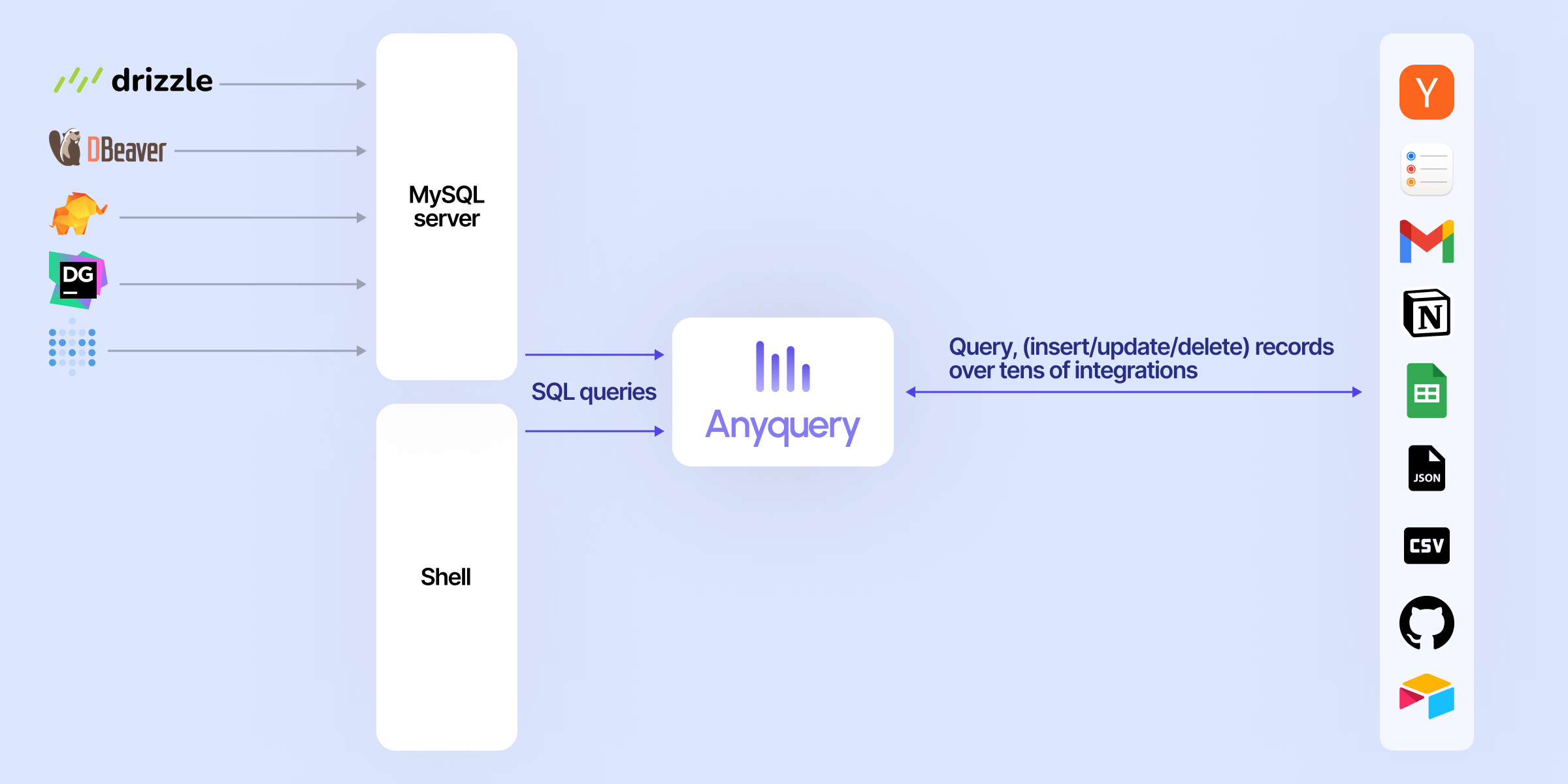 |
| 49 | |
| 50 | |
| 51 | |
| 52 | ## Usage |
| 53 | |
| 54 | ### Connecting LLM |
| 55 | |
| 56 | LLMs can connect to Anyquery using the [Model Context Protocol (MCP)](https://anyquery.dev/docs/reference/commands/anyquery_mcp). This protocol provides context for LLMs that support it. You can start the MCP server with the following command: |
| 57 | |
| 58 | ```bash |
| 59 | # To be started by the LLM client |
| 60 | anyquery mcp --stdio |
| 61 | # To connect using an HTTP and SSE tunnel |
| 62 | anyquery mcp --host 127.0.0.1 --port 8070 |
| 63 | ``` |
| 64 | |
| 65 | You can also connect to clients that supports function calling (e.g. ChatGPT, TypingMind). Refer to each [connection guide](https://anyquery.dev/integrations#llm) in the documentation for more information. |
| 66 | |
| 67 | ```bash |
| 68 | # Copy the ID returned by the command, and pa |
People who liked this also viewed
6 picksType
- redis-vl-pythonRedis Vector Library (RedisVL) -- the AI-native Python client for Redis.MCP ServersJul 2026
- pipeworx gatewayLive data for AI agents. 250+ data sources, 900+ tools. Ask questions in plain English with ask_pipeworx — trade flows, SEC filings, drug safety, housing data, and more. No API keys needed.MCP Serversrecently
- dbt-mcpA MCP (Model Context Protocol) server for interacting with dbt.MCP ServersJul 2026
- mcp-server-chart🤖 A visualization mcp & skills contains 25+ visual charts using @antvis. Using for chart generation and data analysis.MCP ServersMay 2026
- mempalaceThe best-benchmarked open-source AI memory system. And it's free.MCP ServersJul 2026
- jupyter-mcp-server🪐 🔧 Model Context Protocol (MCP) Server for Jupyter.MCP ServersJul 2026


