
BloodHound-MCP is a powerful integration that brings the capabilities of Model Context Procotol (MCP) Server to BloodHound, the industry-standard tool for Active Directory security analysis. This integration allows you to analyze BloodHound data using natural language, making com
How to install bloodhound-mcp-ai?
mordavid/bloodhound-mcp-ai
$git clone https://github.com/mordavid/bloodhound-mcp-aiInstalls into the current project.
›Prefer a prompt? Paste this to your agent
Install bloodhound-mcp-ai by running `git clone https://github.com/mordavid/bloodhound-mcp-ai`, then use it for the current task and follow its documentation at https://github.com/mordavid/bloodhound-mcp-ai.
README.md
| 1 | # BloodHound-MCP |
| 2 | |
| 3 |  |
| 4 | |
| 5 | ## Model Context Protocol (MCP) Server for BloodHound |
| 6 | |
| 7 | BloodHound-MCP is a powerful integration that brings the capabilities of Model Context Procotol (MCP) Server to BloodHound, the industry-standard tool for Active Directory security analysis. This integration allows you to analyze BloodHound data using natural language, making complex Active Directory attack path analysis accessible to everyone. |
| 8 | |
| 9 | > 🥇 **First-Ever BloodHound AI Integration!** |
| 10 | > This is the first integration that connects BloodHound with AI through MCP, [originally announced here](https://www.linkedin.com/posts/mor-david-cyber_bloodhound-ai-cybersec-activity-7310921541213470721-N390). |
| 11 | |
| 12 | ## 🔍 What is BloodHound-MCP? |
| 13 | |
| 14 | BloodHound-MCP combines the power of: |
| 15 | - **BloodHound**: Industry-standard tool for visualizing and analyzing Active Directory attack paths |
| 16 | - **Model Context Protocol (MCP)**: An open protocol for creating custom AI tools, compatible with various AI models |
| 17 | - **Neo4j**: Graph database used by BloodHound to store AD relationship data |
| 18 | |
| 19 | With over 75 specialized tools based on the original BloodHound CE Cypher queries, BloodHound-MCP allows security professionals to: |
| 20 | - Query BloodHound data using natural language |
| 21 | - Discover complex attack paths in Active Directory environments |
| 22 | - Assess Active Directory security posture more efficiently |
| 23 | - Generate detailed security reports for stakeholders |
| 24 | |
| 25 | ## 📱 Community |
| 26 | |
| 27 | Join our Telegram channel for updates, tips, and discussion: |
| 28 | - **Telegram**: [root_sec](https://t.me/root_sec) |
| 29 | |
| 30 | ## 🌟 Star History |
| 31 | |
| 32 | [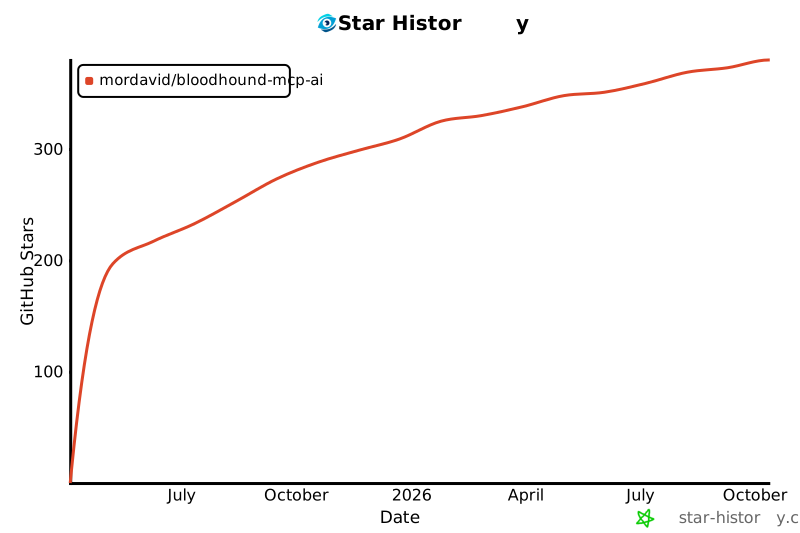](https://www.star-history.com/#MorDavid/BloodHound-MCP-AI&Date) |
| 33 | |
| 34 | ## ✨ Features |
| 35 | |
| 36 | - **Natural Language Interface**: Query BloodHound data using plain English |
| 37 | - **Comprehensive Analysis Categories**: |
| 38 | - Domain structure mapping |
| 39 | - Privilege escalation paths |
| 40 | - Kerberos security issues (Kerberoasting, AS-REP Roasting) |
| 41 | - Certificate services vulnerabilities |
| 42 | - Active Directory hygiene assessment |
| 43 | - NTLM relay attack vectors |
| 44 | - Delegation abuse opportunities |
| 45 | - And much more! |
| 46 | |
| 47 | ## 📋 Prerequisites |
| 48 | |
| 49 | - BloodHound 4.x+ with data collected from an Active Directory environment |
| 50 | - Neo4j database with BloodHound data loaded |
| 51 | - Python 3.8 or higher |
| 52 | - MCP Client |
| 53 | |
| 54 | ## 🔧 Installation |
| 55 | |
| 56 | 1. Clone this repository: |
| 57 | ```bash |
| 58 | git clone https://github.com/your-username/MCP-BloodHound.git |
| 59 | cd MCP-BloodHound |
| 60 | ``` |
| 61 | |
| 62 | 2. Install dependencies: |
| 63 | ```bash |
| 64 | pip install -r requirements.txt |
| 65 | ``` |
| 66 | 3. Configure the MCP Server |
| 67 | ```bash |
| 68 | "mcpServers": { |
| 69 | "BloodHound-MCP": { |
| 70 | "command": "python", |
| 71 | "args": [ |
| 72 | "<Your_Path>\\BloodHound-MCP.py" |
| 73 | ], |
| 74 | "env": { |
| 75 | "BLOODHOUND_URI": "bolt://localhost:7687", |
| 76 | "BLOODHOUND_USERNAME": "neo4j", |
| 77 | "BLOODHOUND_PASSWORD": "bloodhoundcommunityedition" |
| 78 | } |
| 79 | } |
| 80 | } |
| 81 | ``` |
| 82 | ## 🚀 Usage |
| 83 | |
| 84 | Example queries you can ask through the MCP: |
| 85 | |
| 86 | - "Show me all paths from kerberoastable users to Domain Admins" |
| 87 | - "Find computers where Domain Users have local admin rights" |
| 88 | - "Identify Domain Controllers vulnerable to NTLM relay attacks" |
| 89 | - "Map all Active Directory certificate services vulnerabilities" |
| 90 | - "Generate a comprehensive security report for my domain" |
| 91 | - "Find inactive privileged accounts" |
| 92 | - "Show me attack paths to high-value targets" |
| 93 | |
| 94 | ## 🔐 Security Considerations |
| 95 | |
| 96 | This tool is designed for legitimate security assessment purposes. Always: |
| 97 | - Obtain proper authorization before analyzing any Active Directory environment |
| 98 | - Handle BloodHound data as sensitive information |
| 99 | - Follow responsible disclosure practices for any vulnerabilities discovered |
| 100 | |
| 101 | ## 📜 License |
| 102 | |
| 103 | This project is licensed under the MIT License - see the LICENSE file for details. |
| 104 | |
| 105 | ## 🙏 Acknowledgments |
| 106 | |
| 107 | - The BloodHound team for creating an amazing Active Directo |
Related
6 picksType
- mcp-scannerA tool to scan MCP servers and tools for security findingsJul 2026
- hol-guardOpen-source antivirus and runtime protection for AI agents, tools, MCP servers, plugins, skills, and package installs.Jul 2026
- agent-scanAgent supply chain security scanner.Jul 2026
- falcon-mcpConnects AI agents with CrowdStrike Falcon for security analysis and automation.Jul 2026
- pythonPlug-and-play auth for Python MCP servers.Aug 2025
- auth0-mcp-serverAuth0 MCP Server: Manage Auth0 applications, APIs, actions, logs, and forms using natural languageJul 2026


