
magic
starsforks
How to install magic?
polterguy/magic
$git clone https://github.com/polterguy/magic> Magic is an open-source, self-hostable AI software development platform that generates and runs full-stack business applications and AI agents from natural language.
README.md
| 1 | # Magic Cloud - Fully Autonomous AI-based Software Development Assistant |
| 2 | |
| 3 | > Magic is an open-source, self-hostable AI software development platform that generates and runs full-stack business applications and AI agents from natural language. |
| 4 | |
| 5 | Magic is built on top of [OpenAI](https://openai.com) and [Hyperlambda](https://ainiro.io/hyperlambda/), a DSL specifically created to solve anything related to backend software development, and to be _"The AI agent programming language"_. Create full stack apps, in an open source environment, resembling Lovable, Bolt, or Replit. Use natural language as input, and host it on your own hardware if you wish. |
| 6 | |
| 7 | No additional _"backend connectors"_ or _"database connectors"_ required - **zero lock-in**. Everything is 100% integrated, thanks to SQLite, with optional MySQL, PostgreSQL, and Microsoft SQL Server capabilities. You can run the whole thing on your own hardware if you wish. |
| 8 | |
| 9 | **Note:** The Hyperlambda code generator is currently free. Future pricing: $49 per 1,000 requests (no payment wall today). |
| 10 | |
| 11 | ## Open Source _"Vibe Coding"_ Platform |
| 12 | |
| 13 | Below is an app that was created with the following prompt; |
| 14 | |
| 15 | > Create me a full stack app to manage VIP customer for a car dealership |
| 16 | |
| 17 | The whole process took about 30 minutes in total, with less than a handful of errors, correcting the LLM or giving feedback some 5 to 10 times during the process. All bugs were easily tracked down and eliminated by a seasoned software developer during the process. |
| 18 | |
| 19 | 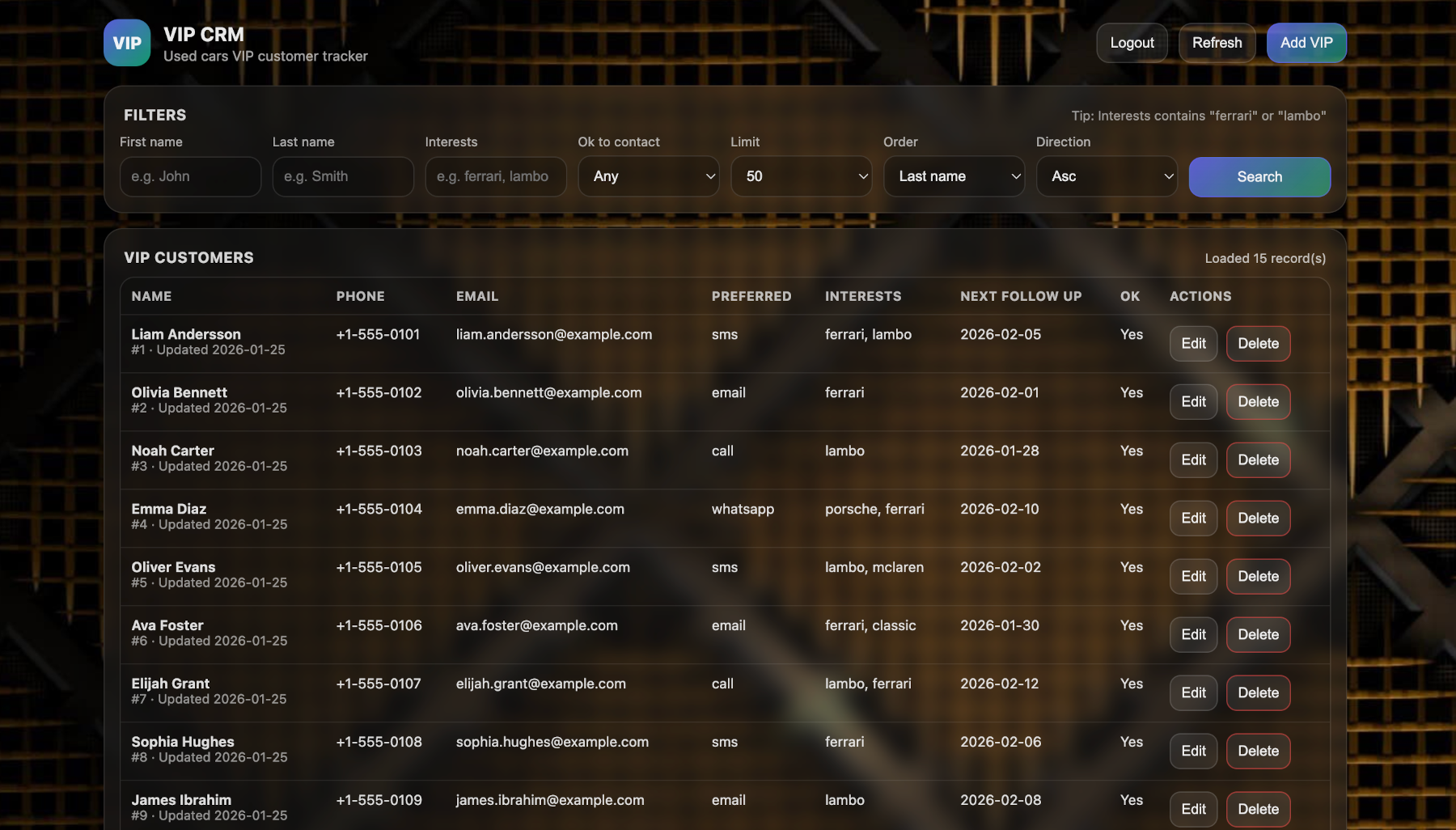 |
| 20 | |
| 21 | Magic asked a handful of control questions, before it automatically generated the database, created the backend code using the integrated Hyperlambda Generator, and finally assembled the frontend based upon the API - complete with authentication and authorization. Everything was deployed locally, on the integrated and built-in web server. |
| 22 | |
| 23 | **Once you save the code, you can test it! No _"deployment"_ or _"publish"_ required to test code.** |
| 24 | |
| 25 | ## Getting Started |
| 26 | |
| 27 | ### Deploy to DigitalOcean (Recommended) |
| 28 | |
| 29 | The fastest way to get Magic running is a single DigitalOcean droplet — one container running the full stack, with persistent volumes for your data, configuration, and modules: |
| 30 | |
| 31 | **[Create your droplet](https://cloud.digitalocean.com/droplets/new)** — edit the one `DOMAIN=` line in [`.do/cloud-init.yaml`](.do/cloud-init.yaml) and paste it into the *User Data* field during creation. HTTPS is automatic (Caddy + Let's Encrypt). Full guide: **[DigitalOcean deployment guide](docs/deploy-digitalocean.md)** |
| 32 | |
| 33 | Connect to SQLite or any external database (MySQL, PostgreSQL, MSSQL). |
| 34 | |
| 35 | ### Docker Compose (Self-Hosted) |
| 36 | |
| 37 | Alternatively, run Magic locally or on your own hardware using Docker Compose: |
| 38 | |
| 39 | ```yaml |
| 40 | version: "3.8" |
| 41 | |
| 42 | services: |
| 43 | backend: |
| 44 | image: servergardens/magic-backend:latest |
| 45 | platform: linux/amd64 |
| 46 | container_name: magic_backend |
| 47 | restart: unless-stopped |
| 48 | |
| 49 | ports: |
| 50 | - "4444:4444" |
| 51 | |
| 52 | volumes: |
| 53 | - magic_files_etc:/magic/files/etc |
| 54 | - magic_files_data:/magic/files/data |
| 55 | - magic_files_config:/magic/files/config |
| 56 | - magic_files_modules:/magic/files/modules |
| 57 | |
| 58 | frontend: |
| 59 | image: servergardens/magic-frontend:latest |
| 60 | container_name: magic_frontend |
| 61 | restart: unless-stopped |
| 62 | |
| 63 | depends_on: |
| 64 | - backend |
| 65 | |
| 66 | ports: |
| 67 | - "5555:80" |
| 68 | |
| 69 | volumes: |
| 70 | magic_files_etc: |
| 71 | magic_files_data: |
| 72 | magic_files_config: |
| 73 | magic_files_modules: |
| 74 | ``` |
| 75 | |
| 76 | Save it somewhere, execute `docker compose up`, visit `localhost:5555`, login with _"root"_ / _"root"_, and configure the system. You can [read more here](https://docs.ainiro.io/getting-started/) for alternatives, such as running the codebase directly on your own machine. |
| 77 | |
| 78 | You can also watch me [guide you through the setup process here](https://www.youtube.com/watch?v=k6eSKxc6oM8). |
| 79 | |
| 80 | ### Bring your own OpenAI API key |
| 81 | |
| 82 | To use the system you'll need an OpenAI API key. You can create one |
People who liked this also viewed
6 picksType
- Scrapling🕷️ An adaptive Web Scraping framework that handles everything from a single request to a full-scale crawl!MCP ServersJul 2026
- excel-mcp-serverA Model Context Protocol server for Excel file manipulationMCP ServersApr 2026
- Excel-MCP-Server-MasterExcel MCP Server - Manipulate Excel files without Microsoft Excel. Model Context Protocol for XLSX, XLSM with Claude AI integrationMCP ServersJun 2025
- agent-deviceCLI to control iOS and Android devices for AI agentsMCP ServersJul 2026
- n8n-mcpA MCP for Claude Desktop / Claude Code / Windsurf / Cursor to build n8n workflows for you MCP ServersJul 2026
- ha-mcpThe Unofficial and Awesome Home Assistant MCP ServerMCP ServersJul 2026


