
davinci-resolve-mcp
bysamuelgursky· 1 MCP server
A Model Context Protocol (MCP) server that lets AI assistants control DaVinci Resolve Studio through the official Scripting API. It provides full API coverage plus guarded workflow helpers for editing, media pool organization, render setup, review markers, grading, Fusion, Fairli
How to install davinci-resolve-mcp?
samuelgursky/davinci-resolve-mcp
$git clone https://github.com/samuelgursky/davinci-resolve-mcpInstalls into the current project.
›Prefer a prompt? Paste this to your agent
Install davinci-resolve-mcp by running `git clone https://github.com/samuelgursky/davinci-resolve-mcp`, then use it for the current task and follow its documentation at https://github.com/samuelgursky/davinci-resolve-mcp.
README.md
| 1 | # DaVinci Resolve MCP Server |
| 2 | |
| 3 | [](https://github.com/samuelgursky/davinci-resolve-mcp/releases) |
| 4 | [](https://www.npmjs.com/package/davinci-resolve-mcp) |
| 5 | [](docs/reference/api-coverage.md) |
| 6 | [-blue.svg)](#server-modes) |
| 7 | [-18%20tools-blueviolet.svg)](#server-modes) |
| 8 | [](docs/reference/api-coverage.md#test-results) |
| 9 | [](https://www.blackmagicdesign.com/products/davinciresolve) |
| 10 | [](https://www.python.org/downloads/) |
| 11 | [](https://opensource.org/licenses/MIT) |
| 12 | |
| 13 | A Model Context Protocol (MCP) server that lets AI assistants control DaVinci Resolve Studio through the official Scripting API. It provides full API coverage plus guarded workflow helpers for editing, media pool organization, render setup, review markers, grading, Fusion, Fairlight, project lifecycle tasks, extension authoring, and source-safe media analysis. |
| 14 | |
| 15 | [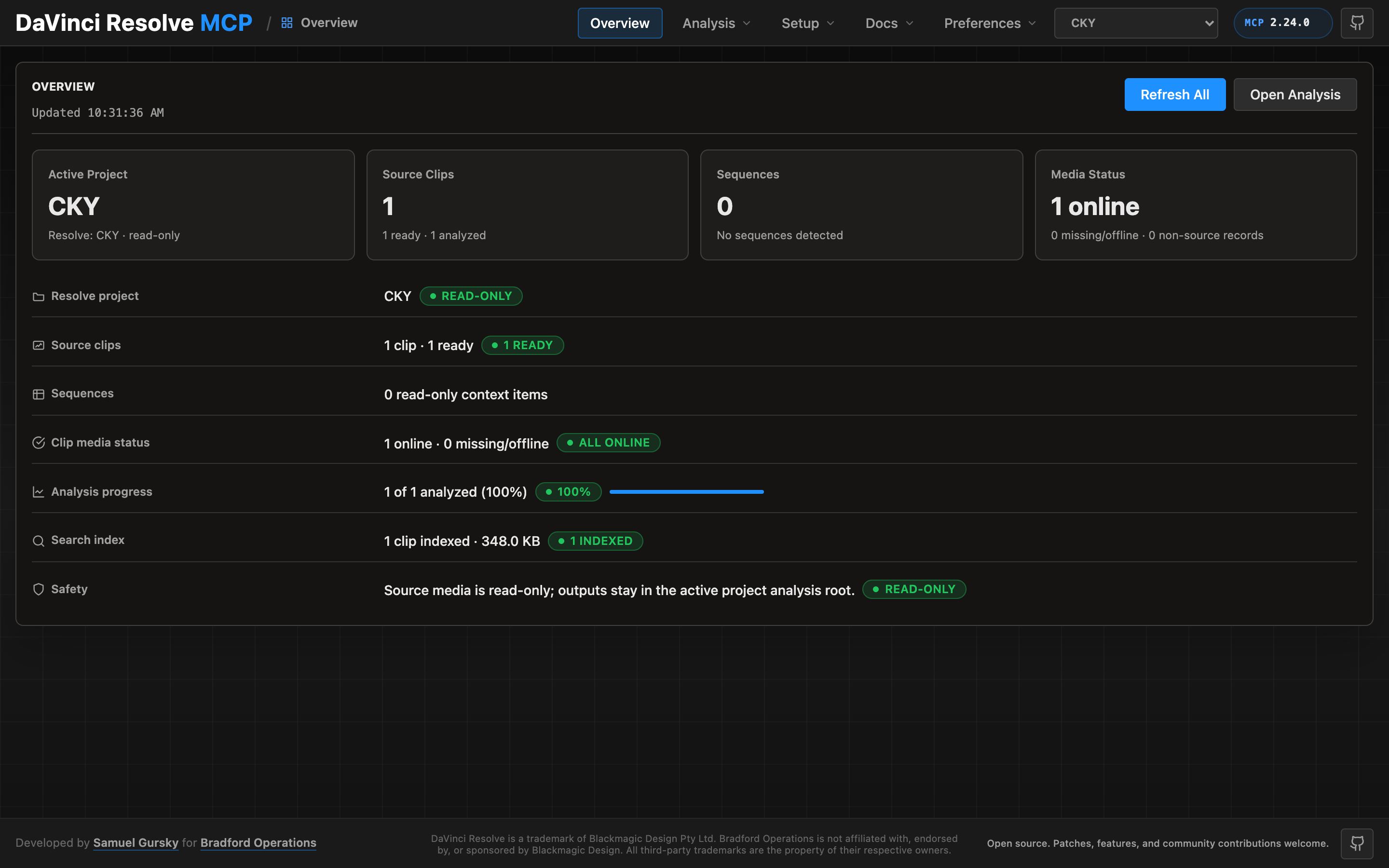](docs/guides/control-panel.md) |
| 16 | |
| 17 | A local browser control panel ships with the server for inspecting Resolve state, running source-safe analysis, drilling into analyzed clips and shots, and editing analysis output inline. See the [Control Panel Guide](docs/guides/control-panel.md) for the full tour. |
| 18 | |
| 19 | ## Quick Start |
| 20 | |
| 21 | ```bash |
| 22 | npx davinci-resolve-mcp setup |
| 23 | ``` |
| 24 | |
| 25 | Before connecting, open DaVinci Resolve Studio and set **Preferences > General > External scripting using** to **Local**. The npm launcher installs a managed copy under your user application-data directory, then runs the universal Python installer. The installer creates a virtual environment, detects Resolve paths, and can configure Claude Desktop, Claude Code, Cursor, VS Code, Windsurf, Zed, Continue, Cline, Roo Code, OpenCode, and JetBrains IDEs. |
| 26 | |
| 27 | For source installs: |
| 28 | |
| 29 | ```bash |
| 30 | git clone https://github.com/samuelgursky/davinci-resolve-mcp.git |
| 31 | cd davinci-resolve-mcp |
| 32 | python install.py |
| 33 | ``` |
| 34 | |
| 35 | For platform paths, client-specific config, and manual setup, see [Installation and Configuration](docs/install.md). |
| 36 | |
| 37 | The installer and server check the latest GitHub release for MCP updates. Checks are best-effort and throttled; the server never blocks MCP startup for a prompt. The installer can prompt, snooze, ignore a release, disable checks, or apply an opt-in safe auto-update for clean git checkouts. |
| 38 | |
| 39 | ## Local Control Panel |
| 40 | |
| 41 | Launch the single-user local control panel from the repository root: |
| 42 | |
| 43 | ```bash |
| 44 | venv/bin/python -m src.control_panel |
| 45 | ``` |
| 46 | |
| 47 | The command starts a localhost server and opens the control panel in your browser. To have an AI coding agent do this, ask: **"Open the Resolve MCP control panel for this repo."** Agents should use `venv/bin/python -m src.control_panel` unless your Python environment is already active. Persisted analysis jobs refresh the local search index automatically after successful slices; the manual Build Index action is for rebuilding from existing reports. |
| 48 | |
| 49 | ## Server Modes |
| 50 | |
| 51 | | Mode | Entry point | Tools | Best for | |
| 52 | |------|-------------|-------|----------| |
| 53 | | Compound | `src/server.py` | 34 | Default mode for most assistants. Related Resolve operations are grouped behind action parameters to keep context usage low. | |
| 54 | | Full / granular | `src/server.py --full` or `src/resolve_mcp_server.py` | 341 | Power users who want one MCP tool per Resolve API method. | |
| 55 | |
| 56 | The compound server is recommended unless you s |
Related
6 picksType
- comfyui-mcpMCP server + Claude Code plugin for ComfyUI: run workflows, generate images, manage models & VRAM.Jul 2026
- elevenlabs-mcpMCP server that enables interaction with Text to Speech, Voice Agents and audio processing APIsJul 2026
- monetElectron video editor with terminal-first controls, transcription, embeddings, and exportJul 2026
- nanobanana-mcp-serverAI image generation with Gemini 3 Pro (4K) and 2.5 Flash. Smart model selection.May 2026
- minimax-mcpMinimax MCP ServerMay 2026
- kinocutGuardrailed video editing for AI agents: FFmpeg, captions, effects, Hyperframes, and receipts.Jul 2026


