
ableton-live-mcp-server
bysimon-kansara· 1 MCP server
The Ableton Live MCP Server is a server implementing the Model Context Protocol (MCP) to facilitate communication between LLMs and Ableton Live. It uses OSC (Open Sound Control) to send and receive messages to/from Ableton Live. It i
How to install ableton-live-mcp-server?
simon-kansara/ableton-live-mcp-server
$git clone https://github.com/simon-kansara/ableton-live-mcp-serverInstalls into the current project.
›Prefer a prompt? Paste this to your agent
Install ableton-live-mcp-server by running `git clone https://github.com/simon-kansara/ableton-live-mcp-server`, then use it for the current task and follow its documentation at https://github.com/simon-kansara/ableton-live-mcp-server.
README.md
| 1 | # Ableton Live MCP Server |
| 2 | |
| 3 | ## 📌 Overview |
| 4 | |
| 5 | The **Ableton Live MCP Server** is a server implementing the |
| 6 | [Model Context Protocol (MCP)](https://modelcontextprotocol.io) to facilitate |
| 7 | communication between LLMs and **Ableton Live**. It uses **OSC (Open Sound |
| 8 | Control)** to send and receive messages to/from Ableton Live. It is based on |
| 9 | [AbletonOSC](https://github.com/ideoforms/AbletonOSC) implementation and |
| 10 | exhaustively maps available OSC adresses to |
| 11 | [**tools**](https://modelcontextprotocol.io/docs/concepts/tools) accessible to |
| 12 | MCP clients. |
| 13 | |
| 14 | [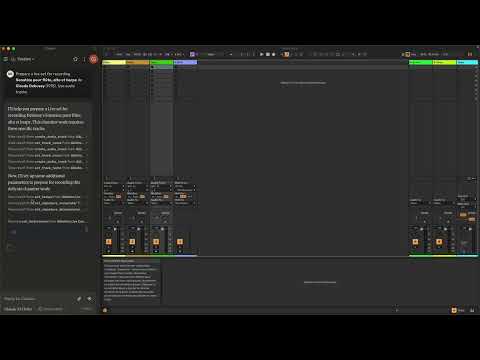](https://www.youtube.com/watch?v=12MzsQ3V7cs) |
| 15 | |
| 16 | This project consists of two main components: |
| 17 | |
| 18 | - `mcp_ableton_server.py`: The MCP server handling the communication between |
| 19 | clients and the OSC daemon. |
| 20 | - `osc_daemon.py`: The OSC daemon responsible for relaying commands to Ableton |
| 21 | Live and processing responses. |
| 22 | |
| 23 | ## ✨ Features |
| 24 | |
| 25 | - Provides an MCP-compatible API for controlling Ableton Live from MCP clients. |
| 26 | - Uses **python-osc** for sending and receiving OSC messages. |
| 27 | - Based on the OSC implementation from |
| 28 | [AbletonOSC](https://github.com/ideoforms/AbletonOSC). |
| 29 | - Implements request-response handling for Ableton Live commands. |
| 30 | |
| 31 | ## ⚡ Installation |
| 32 | |
| 33 | ### Requirements |
| 34 | |
| 35 | - Python 3.8+ |
| 36 | - `python-osc` (for OSC communication) |
| 37 | - `fastmcp` (for MCP support) |
| 38 | - `uv` (recommended Python package installer) |
| 39 | - [AbletonOSC](https://github.com/ideoforms/AbletonOSC) as a control surface |
| 40 | |
| 41 | ### Installation Steps |
| 42 | |
| 43 | 1. Install `uv` (https://docs.astral.sh/uv/getting-started/installation): |
| 44 | |
| 45 | ```bash |
| 46 | curl -LsSf https://astral.sh/uv/install.sh | sh |
| 47 | ``` |
| 48 | |
| 49 | 2. Clone the repository: |
| 50 | |
| 51 | ```bash |
| 52 | git clone https://github.com/your-username/mcp_ableton_server.git |
| 53 | cd mcp_ableton_server |
| 54 | ``` |
| 55 | |
| 56 | 3. Install the project and its dependencies: |
| 57 | |
| 58 | ```bash |
| 59 | uv sync |
| 60 | ``` |
| 61 | |
| 62 | 4. Install AbletonOSC Follow the instructions at |
| 63 | [AbletonOSC](https://github.com/ideoforms/AbletonOSC) |
| 64 | |
| 65 | ## 🚀 Usage |
| 66 | |
| 67 | ### Running the OSC Daemon |
| 68 | |
| 69 | The OSC daemon will handle OSC communication between the MCP server and Ableton |
| 70 | Live: |
| 71 | |
| 72 | ```bash |
| 73 | uv run osc_daemon.py |
| 74 | ``` |
| 75 | |
| 76 | This will: |
| 77 | |
| 78 | - Listen for MCP client connections on port **65432**. |
| 79 | - Forward messages to Ableton Live via OSC on port **11000**. |
| 80 | - Receive OSC responses from Ableton on port **11001**. |
| 81 | |
| 82 | ### Example Usage |
| 83 | |
| 84 | In Claude desktop, ask Claude: |
| 85 | |
| 86 | - _Prepare a set to record a rock band_ |
| 87 | - _Set the input routing channel of all tracks that have "voice" in their name |
| 88 | to Ext. In 2_ |
| 89 | |
| 90 | ## ⚙️ Configuration |
| 91 | |
| 92 | By default, the server and daemon run on **localhost (127.0.0.1)** with the |
| 93 | following ports: |
| 94 | |
| 95 | - **MCP Server Socket:** 65432 |
| 96 | - **Ableton Live OSC Port (Send):** 11000 |
| 97 | - **Ableton Live OSC Port (Receive):** 11001 |
| 98 | |
| 99 | To modify these, edit the `AbletonOSCDaemon` class in `osc_daemon.py`: |
| 100 | |
| 101 | ```python |
| 102 | self.socket_host = '127.0.0.1' |
| 103 | self.socket_port = 65432 |
| 104 | self.ableton_host = '127.0.0.1' |
| 105 | self.ableton_port = 11000 |
| 106 | self.receive_port = 11001 |
| 107 | ``` |
| 108 | |
| 109 | ### Claude Desktop Configuration |
| 110 | |
| 111 | To use this server with Claude Desktop, you need to configure it in your Claude |
| 112 | Desktop settings. The configuration file location varies by operating system: |
| 113 | |
| 114 | - macOS: `~/Library/Application Support/Claude/claude_desktop_config.json` |
| 115 | - Windows: `%APPDATA%/Claude/claude_desktop_config.json` |
| 116 | |
| 117 | Add the following configuration to your `mcpServers` section: |
| 118 | |
| 119 | ```json |
| 120 | { |
| 121 | "mcpServers": { |
| 122 | "Ableton Live Controller": { |
| 123 | "command": "/path/to/your/project/.venv/bin/python", |
| 124 | "args": ["/path/to/your/project/mcp_ableton_server.py"] |
| 125 | } |
| 126 | } |
| 127 | ``` |
| 128 | |
| 129 | This configuration ensures that: |
| 130 | |
| 131 | - The server runs with all dependencies properly managed |
| 132 | - The project remains portable and reproducible |
| 133 | |
| 134 | ## Contributing |
| 135 | |
| 136 | Feel free to submit issues, feature requests, or pull requests to improve this |
| 137 | project. |
| 138 | |
| 139 | ## License |
| 140 | |
| 141 | This project is licensed under the **MIT License**. See the `LICENSE` file for |
| 142 | details. |
| 143 | |
| 144 | ## Acknowledgments |
| 145 | |
| 146 | - [Model Context Protocol (MCP)](https://modelcon |
Related
6 picksType
- comfyui-mcpMCP server + Claude Code plugin for ComfyUI: run workflows, generate images, manage models & VRAM.Jul 2026
- elevenlabs-mcpMCP server that enables interaction with Text to Speech, Voice Agents and audio processing APIsJul 2026
- monetElectron video editor with terminal-first controls, transcription, embeddings, and exportJul 2026
- nanobanana-mcp-serverAI image generation with Gemini 3 Pro (4K) and 2.5 Flash. Smart model selection.May 2026
- minimax-mcpMinimax MCP ServerMay 2026
- kinocutGuardrailed video editing for AI agents: FFmpeg, captions, effects, Hyperframes, and receipts.Jul 2026


