
Grompt_plugin
starsforks
How to install Grompt_plugin?
jgravelle/grompt_plugin
$git clone https://github.com/jgravelle/Grompt_plugin git clone https://github.com/your-repo/Grompt.git `` or download and extract the ZIP file from the repository.README.md
| 1 | # Grompt Chrome Plugin |
| 2 | |
| 3 | 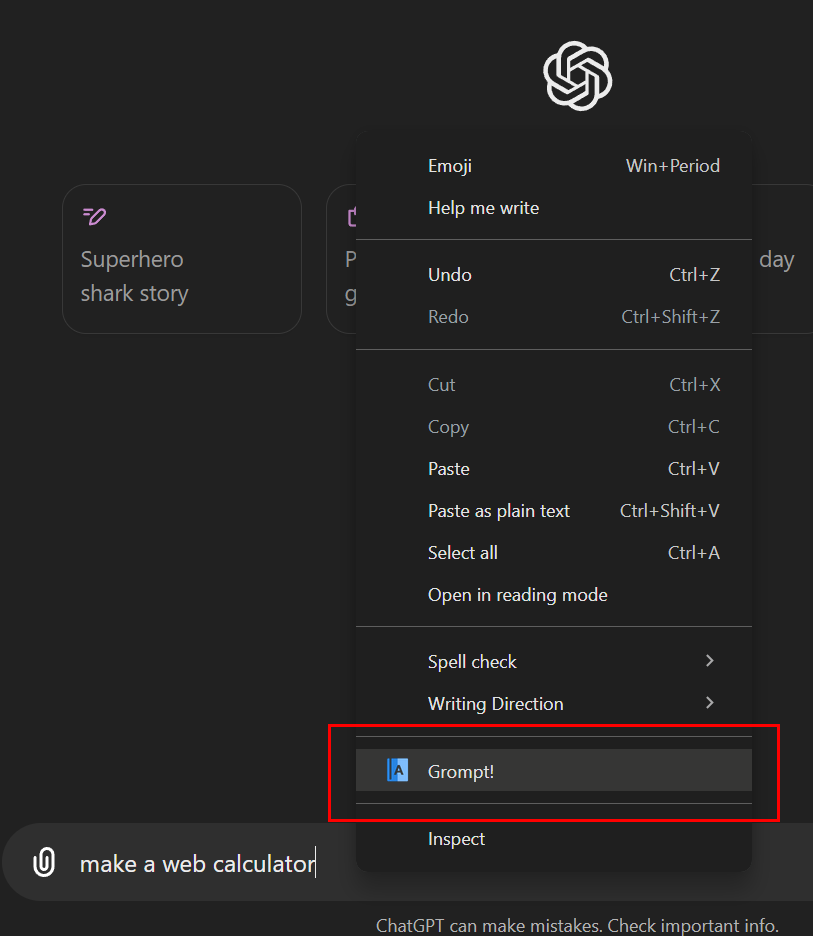 |
| 4 | |
| 5 | 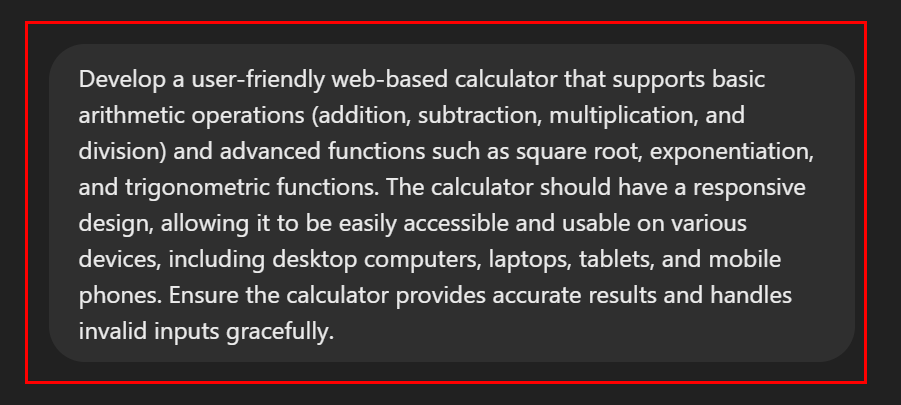 |
| 6 | |
| 7 | |
| 8 | ## Description |
| 9 | Grompt is a self-contained Chrome plugin that re-engineers your prompts for optimal results using the Groq API. It allows users to quickly refine their prompts directly within their browser, enhancing the quality of their AI interactions. |
| 10 | |
| 11 | ## Installation |
| 12 | |
| 13 | ### Prerequisites |
| 14 | - Google Chrome browser |
| 15 | - Groq API key |
| 16 | |
| 17 | ### Installing the Grompt Plugin |
| 18 | |
| 19 | 1. Clone or download the Grompt repository to your local machine: |
| 20 | ``` |
| 21 | git clone https://github.com/your-repo/Grompt.git |
| 22 | ``` |
| 23 | or download and extract the ZIP file from the repository. |
| 24 | |
| 25 | 2. Open Google Chrome and navigate to `chrome://extensions/`. |
| 26 | |
| 27 | 3. Enable "Developer mode" by toggling the switch in the top right corner. |
| 28 | |
| 29 | 4. Click on "Load unpacked" button that appears after enabling Developer mode. |
| 30 | |
| 31 | 5. Navigate to the `Grompt_plugin` directory within the Grompt folder and select it. |
| 32 | |
| 33 | 6. The Grompt plugin should now be installed and visible in your Chrome extensions. |
| 34 | |
| 35 | ## Configuration |
| 36 | |
| 37 | 1. Click on the Grompt icon in your Chrome toolbar to open the popup. |
| 38 | 2. Enter your Groq API key in the provided field. |
| 39 | 3. Click "Save" to store your API key securely. |
| 40 | |
| 41 | ## File Structure |
| 42 | |
| 43 | ``` |
| 44 | Grompt_plugin/ |
| 45 | │ background.js |
| 46 | │ content.js |
| 47 | │ icon128.png |
| 48 | │ icon16.png |
| 49 | │ icon48.png |
| 50 | │ manifest.json |
| 51 | │ popup.html |
| 52 | │ popup.js |
| 53 | │ README.md |
| 54 | ``` |
| 55 | |
| 56 | ## Usage |
| 57 | |
| 58 | 1. Right-click on the request input text for any LLM and select 'GROMPT!' from the context menu. |
| 59 | 2. The optimized text will replace the original text and be copied to your clipboard. |
| 60 | 3. If the revised text doesn't auto-appear, do a 'Paste' (CTL-V). It's that easy! |
| 61 | |
| 62 | ## Development |
| 63 | |
| 64 | To make changes to the plugin: |
| 65 | |
| 66 | 1. Edit the relevant files in the Grompt_plugin directory. |
| 67 | 2. Save your changes. |
| 68 | 3. Go to `chrome://extensions/` in Chrome. |
| 69 | 4. Find the Grompt plugin and click the "Reload" button. |
| 70 | |
| 71 | ## Troubleshooting |
| 72 | |
| 73 | If you encounter any issues: |
| 74 | |
| 75 | 1. Ensure your Groq API key is correctly entered in the plugin settings. |
| 76 | 2. Check the browser console for any error messages. |
| 77 | 3. Verify that you have an active internet connection. |
| 78 | 4. Try disabling and re-enabling the plugin. |
| 79 | 5. If problems persist, uninstall and reinstall the plugin. |
| 80 | |
| 81 | ## Security Note |
| 82 | |
| 83 | Your Groq API key is stored securely in Chrome's sync storage. However, always keep your API keys confidential and do not share them publicly. |
| 84 | |
| 85 | ## Support |
| 86 | |
| 87 | For support, please get a puppy. Second option: GitHub. |
| 88 | |
| 89 | ## License |
| 90 | |
| 91 | Grompt! is proudly open-source and released under the [MIT License](https://opensource.org/licenses/MIT). |
| 92 | |
| 93 | Thank you for choosing Grompt! as your AI-powered conversational assistant. We are committed to redefining the boundaries of what AI can achieve and empowering you to tackle any question, problem, or project with ease and efficiency. |
| 94 | |
| 95 | ## Copyright (c)2024 J. Gravelle |
| 96 | |
| 97 | Permission is hereby granted, free of charge, to any person obtaining a copy of this software and associated documentation files (the "Software"), to deal in the Software without restriction, including without limitation the rights to use, copy, modify, merge, publish, distribute, sublicense, and/or sell copies of the Software, and to permit persons to whom the Software is furnished to do so, subject to the following conditions: |
| 98 | |
| 99 | **1. The above copyright notice and this permission notice shall be included in all copies or substantial portions of the Software.** |
| 100 | |
| 101 | **2. Any modifications made to the Software must clearly indicate that they are derived from the original work, and the name of the original author (J. Gravelle) must remain intact.** |
| 102 | |
| 103 | **3. Redistributions of the Software in source code form must also include a prominent notice that the code has been modified from the original.** |
| 104 | |
| 105 | THE SOFTWARE IS PROVIDED "AS IS," WITHOUT WARRANTY OF ANY KIND, EXPRESS OR IMPLIED, INCLUDING BUT NOT LIMITED |
People who liked this also viewed
6 picksType
- tunellm chat in text filePromptsJul 2026
- snippetsSupercharge your Snippets in VS Code — Manage your code snippets & AI prompts without quitting your editor.PromptsJul 2026
- prompt-optimizerAn AI prompt optimizer for writing better prompts and getting better AI results.PromptsJul 2026
- chatgpt_system_promptA collection of GPT system prompts and various prompt injection/leaking knowledge.PromptsJul 2026
- prompt-masterA Claude skill that writes the accurate prompts for any AI tool. Zero tokens or credits wasted. Full context and memory retentionPromptsJun 2026
- python-prompt-toolkitLibrary for building powerful interactive command line applications in PythonPromptsMay 2026


