
figma-mcp-bridge
starsforks
How to install figma-mcp-bridge?
gethopp/figma-mcp-bridge
$git clone https://github.com/gethopp/figma-mcp-bridgeREADME.md
| 1 | # Figma MCP Bridge |
| 2 | |
| 3 | [](https://gethopp.app) |
| 4 | |
| 5 | - [Demo](#demo) |
| 6 | - [Quick Start](#quick-start) |
| 7 | - [Available Tools](#available-tools) |
| 8 | - [Local development](#local-development) |
| 9 | - [Structure](#structure) |
| 10 | - [How it works](#how-it-works) |
| 11 | |
| 12 | <br/> |
| 13 | |
| 14 | <img src="https://raw.githubusercontent.com/gethopp/figma-mcp-bridge/main/logo.png" alt="Figma MCP Bridge" align="center" /> |
| 15 | |
| 16 | <br/> |
| 17 | |
| 18 | While other amazing Figma MCP servers like [Figma-Context-MCP](https://github.com/GLips/Figma-Context-MCP/) exist, one issues is the [API limiting](https://github.com/GLips/Figma-Context-MCP/issues/258) for free users. |
| 19 | |
| 20 | The limit for free accounts is 6 requests per month, yes **per month**. |
| 21 | |
| 22 | Figma MCP Bridge is a solution to this problem. It is a plugin + MCP server that streams live Figma document data to AI tools without hitting Figma API rate limits, so its Figma MCP for the rest of us ✊ |
| 23 | |
| 24 | It supports **multiple Figma files connected simultaneously**; open the plugin in each file and your AI agent can query any of them by `fileKey`. Single-file setups work exactly as before with no changes required. |
| 25 | |
| 26 | It also includes a small, opt-in set of **write tools** for safe agent-driven edits — see [Editing Notes](#editing-notes) below. |
| 27 | |
| 28 | ## Demo |
| 29 | |
| 30 | [Watch a demo of building a UI in Cursor with Figma MCP Bridge](https://youtu.be/ouygIhFBx0g) |
| 31 | |
| 32 | [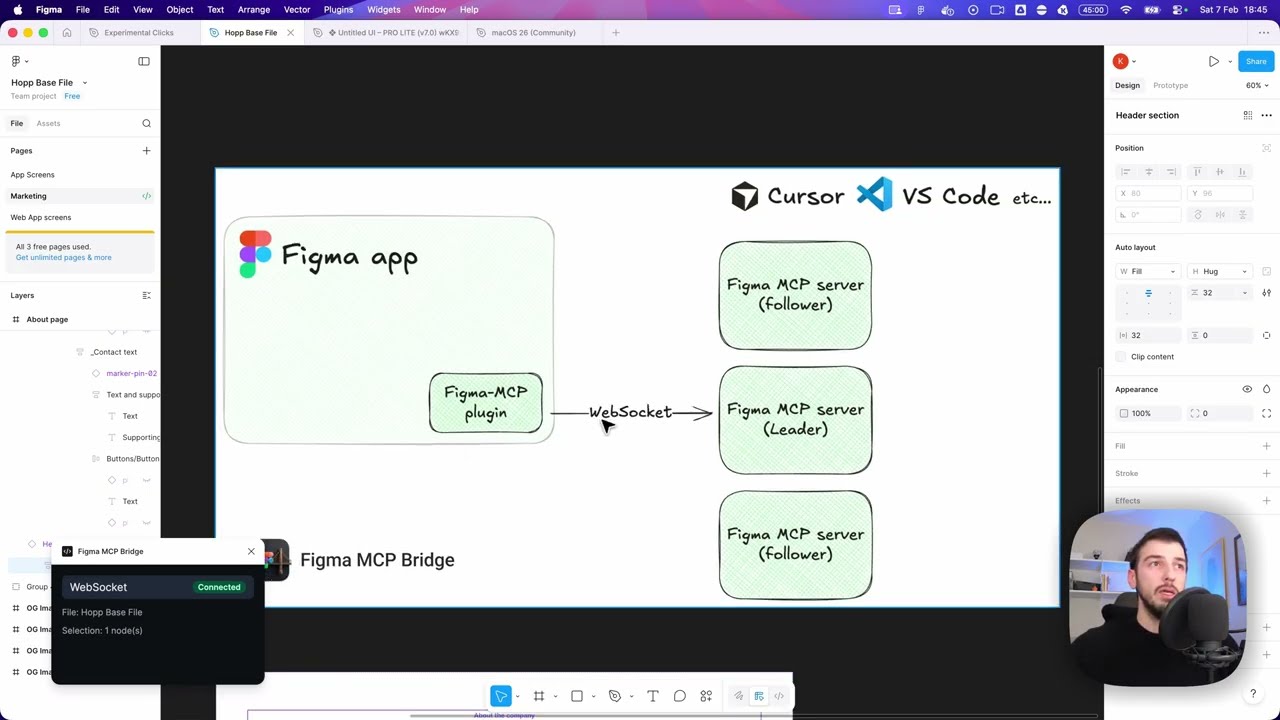](https://youtu.be/ouygIhFBx0g) |
| 33 | |
| 34 | |
| 35 | ## Quick Start |
| 36 | |
| 37 | ### 1. Add the MCP server to your favourite AI tool |
| 38 | |
| 39 | Add the following to your AI tool's MCP configuration (e.g. Cursor, Windsurf, Claude Desktop): |
| 40 | |
| 41 | ```json |
| 42 | { |
| 43 | "figma-bridge": { |
| 44 | "command": "npx", |
| 45 | "args": ["-y", "@gethopp/figma-mcp-bridge"] |
| 46 | } |
| 47 | } |
| 48 | ``` |
| 49 | |
| 50 | That's it — no binaries to download or install. |
| 51 | |
| 52 | ### 2. Add the Figma plugin |
| 53 | |
| 54 | Download the plugin from the [latest release](https://github.com/gethopp/figma-mcp-bridge/releases) page, then in Figma go to `Plugins > Development > Import plugin from manifest` and select the `manifest.json` file from the `plugin/` folder. |
| 55 | |
| 56 | ### 3. Start using it 🎉 |
| 57 | |
| 58 | Open a Figma file, run the plugin, and start prompting your AI tool. The MCP server will automatically connect to the plugin. |
| 59 | |
| 60 | To work across multiple files, just open the plugin in each Figma file. The bridge keeps all connections active and your AI agent can target any of them by `fileKey`. |
| 61 | |
| 62 | If you want to know more about how it works, read the [How it works](#how-it-works) section. |
| 63 | |
| 64 | ## Available Tools |
| 65 | |
| 66 | | Tool | Description | |
| 67 | |------|-------------| |
| 68 | | `list_files` | List all connected Figma files (supports multi-file workflows) | |
| 69 | | `get_document` | Get the current Figma page document tree | |
| 70 | | `get_selection` | Get the currently selected nodes in Figma | |
| 71 | | `get_node` | Get a specific Figma node by ID (colon format, e.g. `4029:12345`) | |
| 72 | | `get_styles` | Get all local paint, text, effect, and grid styles | |
| 73 | | `get_metadata` | Get file name, pages, and current page info | |
| 74 | | `get_design_context` | Get a depth-limited tree optimized for understanding design context | |
| 75 | | `get_variable_defs` | Get all variable collections, modes, and values (design tokens) | |
| 76 | | `get_screenshot` | Export nodes as PNG/SVG/JPG/PDF (base64-encoded) | |
| 77 | | `save_screenshots` | Export and save screenshots directly to the local filesystem | |
| 78 | | `get_motion_styles` | List all available animation presets (beta) | |
| 79 | | `get_node_motion` | Read a node's current animation styles and properties (beta) | |
| 80 | | `apply_animation_style` | Apply a preset animation style to a node (beta) | |
| 81 | | `remove_animation_style` | Remove an applied animation style from a node (beta) | |
| 82 | | `apply_manual_keyframe_track` | Apply a manual keyframe track to a node property (beta) | |
| 83 | | `remove_manual_keyframe_track` | Remove a manual keyframe track from a node property (beta) | |
| 84 | | `set_timeline_duration` | Set the duration of a timeline in seconds (beta) | |
| 85 | | `set_node_visibility` | Show or hide specific nodes | |
| 86 | | `set_tex |
People who liked this also viewed
6 picksType
- Figma-Context-MCPMCP server to provide Figma layout information to AI coding agents like CursorMCP ServersJul 2026
- sunnysideFigma-Context-MCPA comprehensive Model Context Protocol (MCP) server that bridges Figma designs with AI development workflows. It provides 30 specialized tools for extracting pixel-perfect code, assets, and component structures directly from Figma designs.MCP ServersApr 2026
- figma-console-mcpYour design system as an API. Connect AI to Figma for extraction, creation, and debugging.MCP ServersJul 2026
- dcc-mcp-coreCore runtime and shared tooling for DCC-MCP: safe, skill-first MCP integration across Maya, Blender, Houdini, Photoshop, and custom DCC hosts.MCP ServersJul 2026
- godot-aiProduction-grade MCP server and AI tools for the Godot engine. A Snap to install. Totally free and fun.MCP ServersJul 2026
- freecad-mcpFreeCAD MCP(Model Context Protocol) serverMCP ServersJul 2026


